
 AI Grok 匯出器
匯出 Grok 對話PDF、MD、JSON
將 Grok 聊天記錄匯出為 PDF、Markdown、文字、CSV... 免費且完全可自訂。
支援附件、推理和進階輸出。
選擇匯出已就緒
選擇要保留的 Grok 訊息、來源、程式碼區塊和附件。
匯出摘要
> grok-export --format pdf
> saved conversation.pdf
強大功能 讓您的生活更輕鬆
將 Grok 結果下載為 PDF、Markdown...
AI Grok 匯出器支援多種檔案格式。將您的 Grok 對話導出為多種格式,包括:PDF、Markdown、文本(TXT)、JSON、CSV。
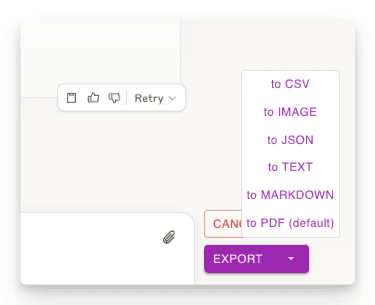
導出部分對話
只下載您需要的對話部分。與其他方法不同,您不必下載整個對話 - 只需選擇您想要的特定回覆!
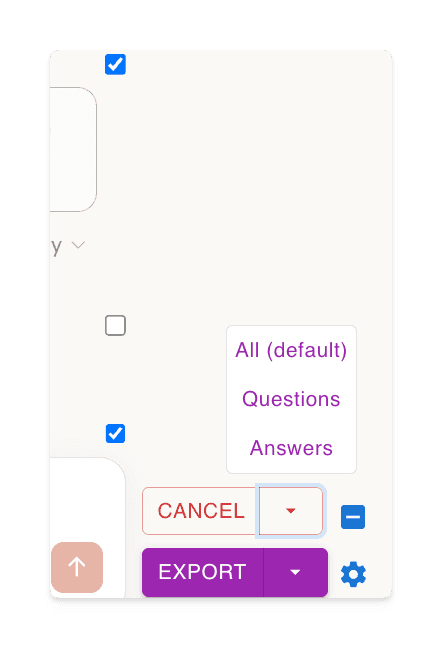
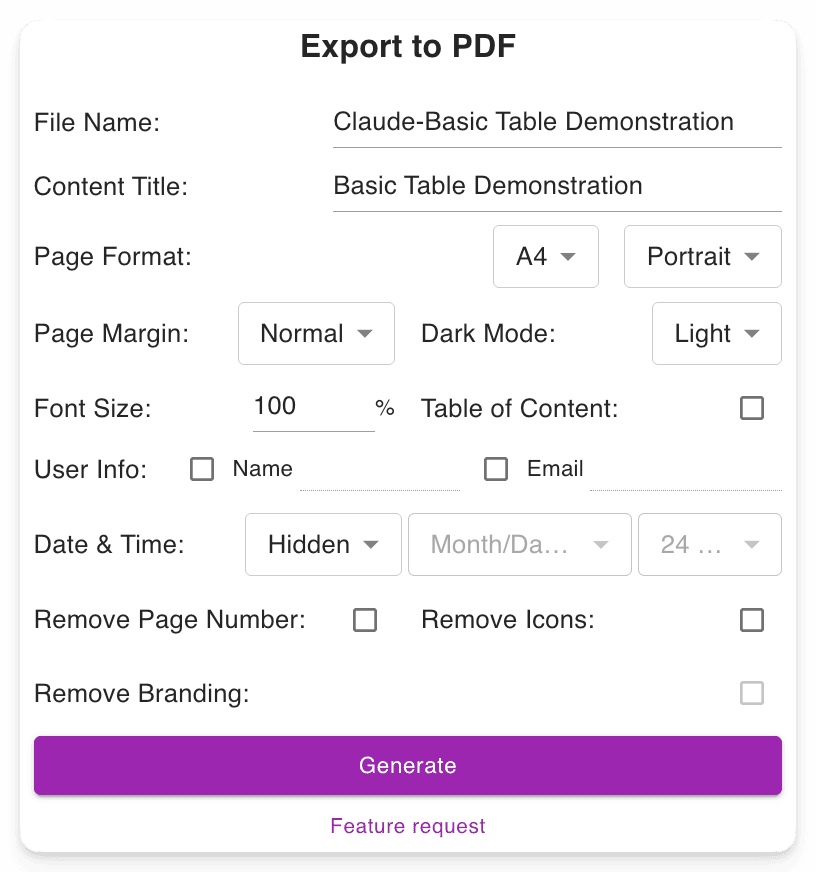
可自定義的下載檔案設定
設定您喜歡的檔案名稱。定義內容標題。調整 PDF 格式,在不改變 Grok 介面的情況下選擇深色或淺色模式。在長 PDF 中包含頁碼以便於導航。
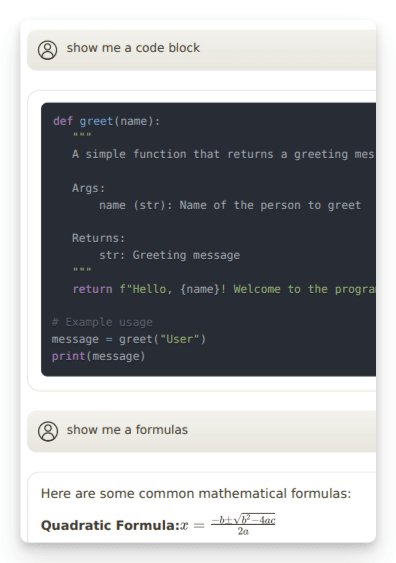
保留進階輸出
保留重要的格式,例如:數學公式(區塊級和行內)。開發人員的程式碼區塊。表格和結構化內容。
"Nice exporter"

"Wonderful and easy to use. The PDF exporter is excellent."

"Used the PDF tool and it worked well. The export to PDF tool Grok shows at the end of the convo only exports the last answer, not the entire conversation. With this tool you can select "all" which is a big time saver. Note, if you find that you are not getting all pages or an error message, try scrolling through the convo top to bottom, then save. I did have a couple issues that scrolling fixed for me."

"Finally something that works! Excellent!"

"好用的"

"It ACTUALLY works, highly recommended if you can't find a working exporter. EZ 5/5"

"Buenísima extensión para Grok."

"很好, 可以完整Export 整個對話, 是Grok 本身沒有的功能"

"Simple of use! Exectry what we do need! Very good product, congrats, congrats, congrats!"

"Works nicely."

"Simple and effective. Excellent helper app."

"非常好 ,好得沒得挑剔 ,尤其大量文字對話上幫助我儲存內容 ,讓我後續有靈感時最大發揮!!"

"Works perfectly, no fuss, rare nowadays, 5 stars!!!"

"Amazing tool, lifesaver, so easy!"

"simplemente practico, 10/10"

"I tried 4 diffferent extensions to export Grok to PDF. This was be far the best (and the pdf export is only in beta!)"

"I suppose I should really have used it for longer but already I am impressed. I have not compared it with others but it is simple which to myself is important. If you have not tried a Grok exporter before then certainly try this first because it is so simple. I got my install and learn time back within a few minutes. After installing you need to refresh he grok screen for the extension to start working. I like printing at 75% so maybe try that and see what you think. There is - well to me - a little logic quirk in that if you want to select individual blocks - say just the last one of maybe 30 - you first have to select all - then a bit appears at the side - where you can unselect all - er wrong logic to me - and then you can manually select just the last block. I didn't notice it at first but IMO it would be better to have this on the first selection. Now I know it will be fine."

"It's just amazing! The best IA chat exporter."

"Exports chats accurately into Pdf and Markdown txt (not used other formats). Very usefull for offline reading."

"inpressed allready with the features"

"Super impressed with this Grok Exporter. The PDF formatting was spot on. Easy to install. Navigation was simple. Very thankful for this being developed."

"I often forget to go back and write reviews on applications that I like but the pop up after each use kept reminding me LOL This extension is absolutely AMAZING It's improved my work flow dramatically and helped me plug a leak of information that I'd just been ignoring until recently. Thank you so much for this"

"Seems to work well. It would nice to be able to pay some cash and get the ads removed from the output."

"Works great and formatting looks good!"

"Still trying to figure out how to use it. I usually use Grok from X. I guess I have to go to a different Grok page?"

"Süper uygulama emeği geçenlere teşekkür ederim.Artık sohbetlerimi arşivleyebileceğim.5 yıldız değil 10 yıldızı hakkediyor,"

"Works"

"Absolutely Awesome!"

"Perfect! Just what I was looking for!! Great Job!"

"NIce work guys, keep improving it."

常見問題
看看其他人對 AI Grok 匯出器 的關注點
什麼是 AI Grok 匯出器?
🎯 AI Grok 匯出器 是一個工具,旨在將您的 Grok 對話輕鬆轉換為美觀的、可分享的文件!AI Grok 匯出器 是將 Grok 結果下載為 PDF、Markdown、文本、JSON 或 CSV 格式的終極工具,無論是工作、學習還是個人參考。
如何使用 AI Grok 匯出器?
請查看 30 秒教學。
簡單來說:
1. 安裝擴充功能。
2. 開啟 grok.com 上的對話。
3. 點擊「匯出」按鈕,將對話下載為 PDF 或其他您喜歡的格式。
我可以免費使用AI Grok 匯出器嗎?
是的,AI Grok 匯出器的大多數功能都是完全免費的。我們只對大量 PDF 生成收取少許費用以支付服務成本。詳細資訊可以在價格頁面找到。
AI Grok 匯出器支援哪些瀏覽器?
我們目前官方支援 Chrome。您也可以透過 Chrome 線上應用程式商店,在Brave和其他基於 Chromium 的瀏覽器上安裝 AI Grok 匯出器。
我可以導出對話中的特定消息嗎?
是的!您可以使用每條消息旁邊的複選框選擇單個消息。為了方便起見,在“選擇”按鈕旁邊還有一個複選框,可以快速選擇或取消選擇所有消息。
您們如何處理我的對話數據?我有隱私方面的擔憂。
您的隱私是我們的首要任務。我們不會存儲您的任何對話數據。當您導出為 PDF 時,數據僅在我們的服務器上臨時處理以生成文件,並在完成後立即刪除。所有其他導出格式(Markdown、文本、JSON、CSV)都在您的瀏覽器中完全處理。我們從不存儲、分析或分享您的對話數據。
如何取消訂閱?
您可以透過點擊帳戶儀表板上的「管理訂閱」按鈕來管理您的訂閱。
你們的退款政策是什麼?
如果您對擴充功能不滿意,只需在購買後 3 天內告訴我們,我們將全額退款,無需任何理由。或者,我們很樂意與您合作解決您可能遇到的任何問題。
您們是否為非營利組織或學生提供折扣?
是的!如果您有一個與組織或學校電子郵件關聯的AI Grok 匯出器帳戶,請聯繫我們以獲取折扣。
我可以用支付寶 (Alipay) 或微信支付 (Wechat Pay) 付款嗎?
是的,您可以。請訪問此頁面:使用支付寶或微信支付付款。
還有其他問題嗎?
如果您有任何其他問題或疑慮,請隨時透過電子郵件聯絡我們。我們很樂意幫助!