
 Exportador AI Grok
Exporta chats de Groka PDF, MD, JSON
Exporta chats de Grok a PDF, Markdown, Texto, CSV... Gratis y completamente personalizable.
Soporta artefactos, razonamiento y salidas avanzadas.
Exportación selectiva lista
Elige los mensajes, fuentes, bloques de código y recursos de Grok que quieres conservar.
Resumen de exportación
> grok-export --format pdf
> saved conversation.pdf
Características Maravillosas haz tu vida más fácil
Descarga resultados de Grok como PDF, Markdown...
Exportador AI Grok admite diversos formatos de archivo. Exporta tus conversaciones de Grok en múltiples formatos, incluyendo: PDF, Markdown, Texto (TXT), JSON y CSV.
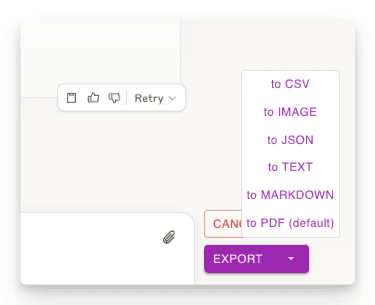
Exporta parte de las conversaciones
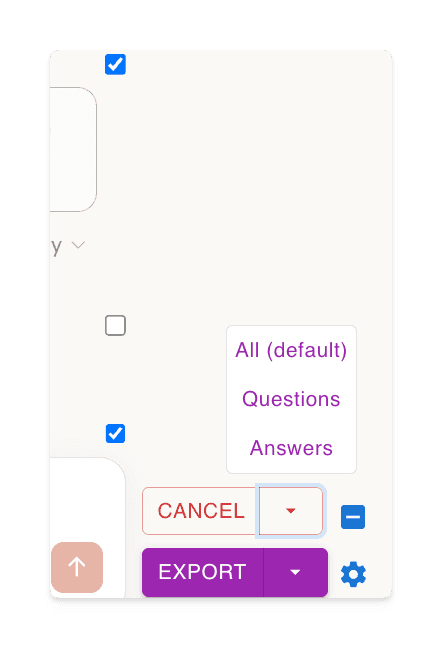
Descarga solo las partes de la conversación que necesitas. A diferencia de otros métodos, no estás obligado a descargar todo el chat, ¡solo selecciona las respuestas específicas que quieres!
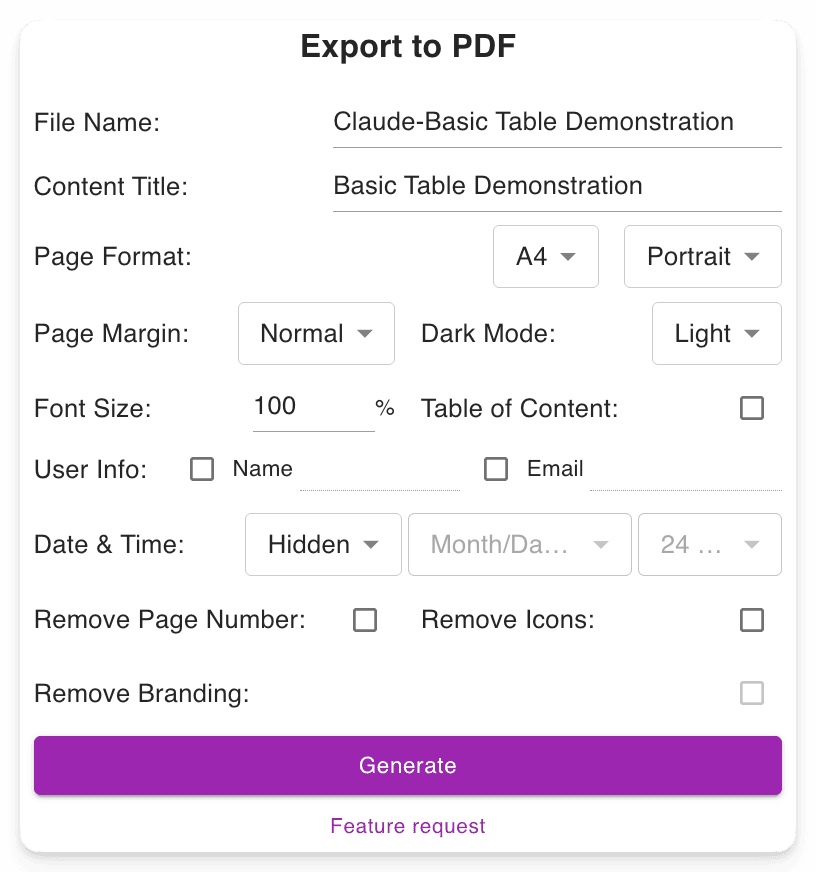
Configuración personalizable de archivos descargados
Establece tu nombre de archivo preferido. Define el título del contenido. Ajusta el formato del PDF, elige entre modo oscuro o claro sin alterar la interfaz de Grok. Incluye números de página para una navegación más fácil en PDFs largos.
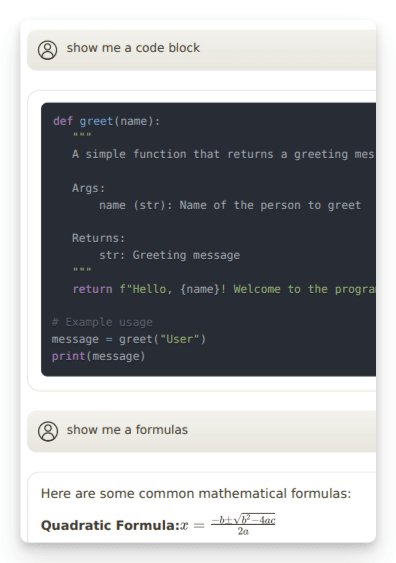
Preserva salidas avanzadas
Conserva el formato esencial de GPT, como: Fórmulas matemáticas (en bloque y en línea). Bloques de código para desarrolladores. Tablas y contenido estructurado.
"Nice exporter"

"Wonderful and easy to use. The PDF exporter is excellent."

"Used the PDF tool and it worked well. The export to PDF tool Grok shows at the end of the convo only exports the last answer, not the entire conversation. With this tool you can select "all" which is a big time saver. Note, if you find that you are not getting all pages or an error message, try scrolling through the convo top to bottom, then save. I did have a couple issues that scrolling fixed for me."

"Finally something that works! Excellent!"

"好用的"

"It ACTUALLY works, highly recommended if you can't find a working exporter. EZ 5/5"

"Buenísima extensión para Grok."

"很好, 可以完整Export 整個對話, 是Grok 本身沒有的功能"

"Simple of use! Exectry what we do need! Very good product, congrats, congrats, congrats!"

"Works nicely."

"Simple and effective. Excellent helper app."

"非常好 ,好得沒得挑剔 ,尤其大量文字對話上幫助我儲存內容 ,讓我後續有靈感時最大發揮!!"

"Works perfectly, no fuss, rare nowadays, 5 stars!!!"

"Amazing tool, lifesaver, so easy!"

"simplemente practico, 10/10"

"I tried 4 diffferent extensions to export Grok to PDF. This was be far the best (and the pdf export is only in beta!)"

"I suppose I should really have used it for longer but already I am impressed. I have not compared it with others but it is simple which to myself is important. If you have not tried a Grok exporter before then certainly try this first because it is so simple. I got my install and learn time back within a few minutes. After installing you need to refresh he grok screen for the extension to start working. I like printing at 75% so maybe try that and see what you think. There is - well to me - a little logic quirk in that if you want to select individual blocks - say just the last one of maybe 30 - you first have to select all - then a bit appears at the side - where you can unselect all - er wrong logic to me - and then you can manually select just the last block. I didn't notice it at first but IMO it would be better to have this on the first selection. Now I know it will be fine."

"It's just amazing! The best IA chat exporter."

"Exports chats accurately into Pdf and Markdown txt (not used other formats). Very usefull for offline reading."

"inpressed allready with the features"

"Super impressed with this Grok Exporter. The PDF formatting was spot on. Easy to install. Navigation was simple. Very thankful for this being developed."

"I often forget to go back and write reviews on applications that I like but the pop up after each use kept reminding me LOL This extension is absolutely AMAZING It's improved my work flow dramatically and helped me plug a leak of information that I'd just been ignoring until recently. Thank you so much for this"

"Seems to work well. It would nice to be able to pay some cash and get the ads removed from the output."

"Works great and formatting looks good!"

"Still trying to figure out how to use it. I usually use Grok from X. I guess I have to go to a different Grok page?"

"Süper uygulama emeği geçenlere teşekkür ederim.Artık sohbetlerimi arşivleyebileceğim.5 yıldız değil 10 yıldızı hakkediyor,"

"Works"

"Absolutely Awesome!"

"Perfect! Just what I was looking for!! Great Job!"

"NIce work guys, keep improving it."

Preguntas Frecuentes
Mira lo que otros preguntan sobre Exportador AI Grok
¿Qué es Exportador AI Grok?
🎯 ¡Exportador AI Grok es una herramienta diseñada para transformar tus conversaciones de Grok en archivos formateados y compartibles sin esfuerzo! Exportador AI Grok es la herramienta definitiva para descargar los resultados de Grok en formatos PDF, Markdown, Texto, JSON o CSV, ya sea para trabajo, estudio o referencia personal.
¿Cómo se usa Exportador AI Grok?
Echa un vistazo al tutorial de 30 segundos.
En resumen:
1. Instala la extensión.
2. Abre una conversación en grok.com.
3. Haz clic en el botón 'Exportar' para descargar la conversación en PDF o en el formato que prefieras.
¿Puedo usar Exportador AI Grok gratis?
Sí, la mayoría de las funciones de Exportador AI Grok son completamente gratuitas. Solo cobramos una pequeña tarifa por la generación intensiva de PDF para cubrir los costos del servicio. Los detalles se pueden encontrar en la página de precios.
¿Qué navegadores soporta Exportador AI Grok?
Actualmente ofrecemos soporte oficial para Chrome. También puedes instalar Exportador AI Grok en Brave y otros navegadores basados en Chromium desde Chrome Web Store.
¿Puedo exportar mensajes específicos de mi conversación?
¡Sí! Puedes seleccionar mensajes individuales usando las casillas de verificación junto a cada mensaje. Para mayor comodidad, también hay una casilla de verificación junto al botón 'Seleccionar' para seleccionar o deseleccionar rápidamente todos los mensajes a la vez.
¿Cómo manejan mis datos de conversación? Tengo preocupaciones sobre la privacidad.
Su privacidad es nuestra máxima prioridad. No almacenamos ninguno de sus datos de conversación. Cuando exporta a PDF, los datos solo se procesan temporalmente en nuestros servidores para generar el archivo y se eliminan inmediatamente después. Todos los demás formatos de exportación (Markdown, Texto, JSON, CSV) se procesan completamente dentro de su navegador. Nunca almacenamos, analizamos o compartimos sus datos de conversación.
¿Cómo puedo cancelar mi suscripción?
Puedes gestionar tu suscripción haciendo clic en el botón 'gestionar suscripción' en el panel de control de tu cuenta.
¿Cuál es la política de reembolso?
Si no estás satisfecho con la extensión, simplemente háznos saber dentro de los 3 días posteriores a tu compra y te haremos un reembolso completo, sin hacer preguntas. Alternativamente, estaremos encantados de trabajar contigo para resolver cualquier problema que puedas tener.
¿Ofrecen descuentos para organizaciones sin fines de lucro o estudiantes?
¡Sí! Si tienes una cuenta de Exportador AI Grok vinculada a tu correo electrónico de organización o escuela, contáctanos para obtener un descuento.
¿Puedo pagar con Alipay(支付宝) o Wechat Pay(微信支付)?
Sí, puede hacerlo. Por favor, visite esta página: Pagar con Alipay o Wechat Pay.
¿Otras preguntas?
Si tienes otras preguntas o inquietudes, contáctanos por correo electrónico. ¡Estaremos encantados de ayudarte!
¿Listo para empezar?
Instala Exportador AI Grok ahora.
Aumenta tu productividad con la herramienta definitiva para descargar resultados de Grok como PDF, Markdown, Texto, JSON o CSV.