
 AI Grok Exporter
Export Grok chatsto PDF, MD, JSON
Export Grok chats to PDF, Markdown, Text, CSV... Free and fully customizable.
Supports artifacts, reasoning & advanced outputs.
Selective export is ready
Choose the Grok messages, sources, code blocks, and assets you want to keep.
Export summary
> grok-export --format pdf
> saved conversation.pdf
Wonderful Features make your life easier
Download Grok results as PDF, Markdown...
AI Grok Exporter supports versatile file formats. Export your Grok conversations in multiple formats, including: PDF, Markdown, Text (TXT), JSON and CSV.
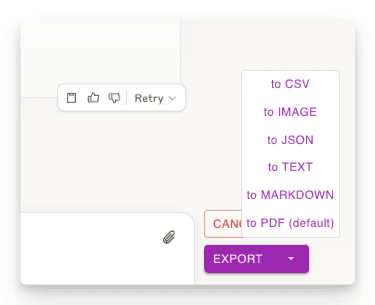
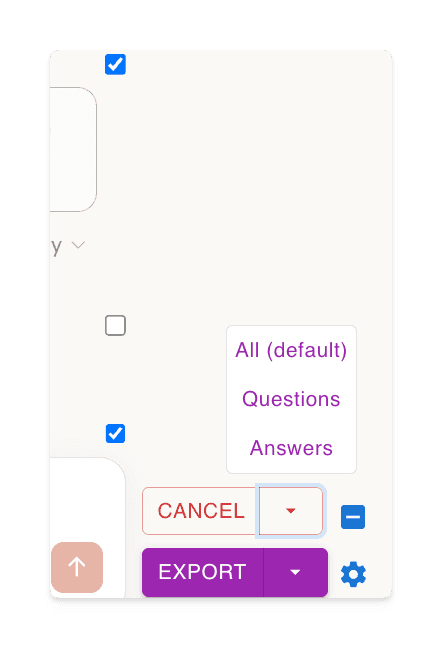
Export part of the conversations
Download only the parts of the conversation you need. Unlike other methods, you're not forced to download the entire chat - just select the specific responses you want!
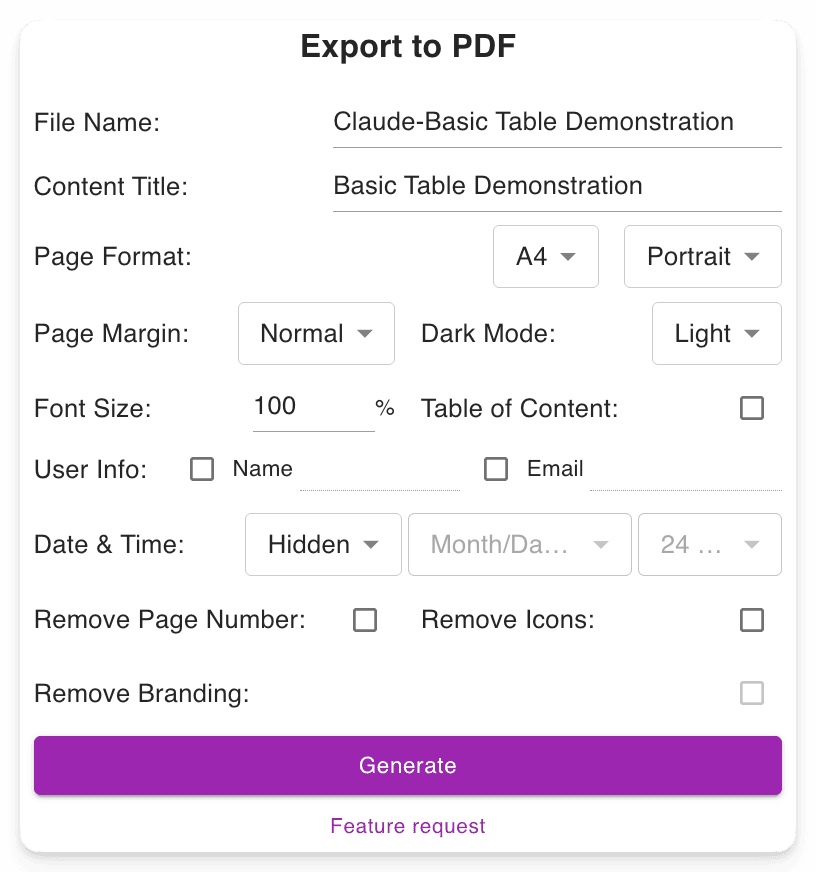
Customizable download file settings
Set your preferred filename. Define the content title. Adjust the PDF format, Choose between dark or light mode without altering the Grok interface. Includes page numbers for easier navigation in long PDFs.
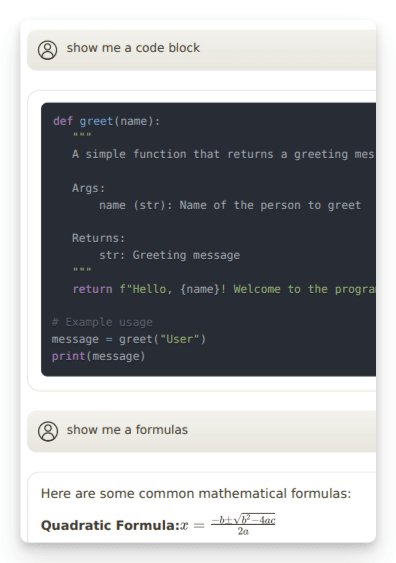
Preserves Advanced Outputs
Retains essential Grok formatting, such as: Mathematical formulas (block and inline). Code blocks for developers. Tables and structured content.
"Nice exporter"

"Wonderful and easy to use. The PDF exporter is excellent."

"Used the PDF tool and it worked well. The export to PDF tool Grok shows at the end of the convo only exports the last answer, not the entire conversation. With this tool you can select "all" which is a big time saver. Note, if you find that you are not getting all pages or an error message, try scrolling through the convo top to bottom, then save. I did have a couple issues that scrolling fixed for me."

"Finally something that works! Excellent!"

"好用的"

"It ACTUALLY works, highly recommended if you can't find a working exporter. EZ 5/5"

"Buenísima extensión para Grok."

"很好, 可以完整Export 整個對話, 是Grok 本身沒有的功能"

"Simple of use! Exectry what we do need! Very good product, congrats, congrats, congrats!"

"Works nicely."

"Simple and effective. Excellent helper app."

"非常好 ,好得沒得挑剔 ,尤其大量文字對話上幫助我儲存內容 ,讓我後續有靈感時最大發揮!!"

"Works perfectly, no fuss, rare nowadays, 5 stars!!!"

"Amazing tool, lifesaver, so easy!"

"simplemente practico, 10/10"

"I tried 4 diffferent extensions to export Grok to PDF. This was be far the best (and the pdf export is only in beta!)"

"I suppose I should really have used it for longer but already I am impressed. I have not compared it with others but it is simple which to myself is important. If you have not tried a Grok exporter before then certainly try this first because it is so simple. I got my install and learn time back within a few minutes. After installing you need to refresh he grok screen for the extension to start working. I like printing at 75% so maybe try that and see what you think. There is - well to me - a little logic quirk in that if you want to select individual blocks - say just the last one of maybe 30 - you first have to select all - then a bit appears at the side - where you can unselect all - er wrong logic to me - and then you can manually select just the last block. I didn't notice it at first but IMO it would be better to have this on the first selection. Now I know it will be fine."

"It's just amazing! The best IA chat exporter."

"Exports chats accurately into Pdf and Markdown txt (not used other formats). Very usefull for offline reading."

"inpressed allready with the features"

"Super impressed with this Grok Exporter. The PDF formatting was spot on. Easy to install. Navigation was simple. Very thankful for this being developed."

"I often forget to go back and write reviews on applications that I like but the pop up after each use kept reminding me LOL This extension is absolutely AMAZING It's improved my work flow dramatically and helped me plug a leak of information that I'd just been ignoring until recently. Thank you so much for this"

"Seems to work well. It would nice to be able to pay some cash and get the ads removed from the output."

"Works great and formatting looks good!"

"Still trying to figure out how to use it. I usually use Grok from X. I guess I have to go to a different Grok page?"

"Süper uygulama emeği geçenlere teşekkür ederim.Artık sohbetlerimi arşivleyebileceğim.5 yıldız değil 10 yıldızı hakkediyor,"

"Works"

"Absolutely Awesome!"

"Perfect! Just what I was looking for!! Great Job!"

"NIce work guys, keep improving it."

Frequently Asked Questions
See what others concerned about AI Grok Exporter
What is AI Grok Exporter?
🎯 AI Grok Exporter is a tool designed to transform your Grok conversations into beautifully formatted, shareable files effortlessly! AI Grok Exporter is the ultimate tool to download Grok results as PDF, Markdown, Text, JSON, or CSV formats, whether for work, study, or personal reference.
How to use AI Grok Exporter?
Please check out the 30-seconds tutorial.
Briefly,
1. Install the extension.
2. Open a conversation on grok.com.
3. Click the 'Export' button to download the conversation to PDF or any other format you prefer.
Can I use AI Grok Exporter for free?
Yes, most features of AI Grok Exporter are completely free. We only charge a small fee for heavy PDF generation to cover service costs. Details can be found in the pricing page.
What browsers does AI Grok Exporter support?
We officially support Chrome. You can also install AI Grok Exporter on Brave and other Chromium-based browsers from the Chrome Web Store.
Can I export specific messages from my conversation?
Yes! You can select individual messages using the checkboxes next to each message. For convenience, there's also a checkbox next to the 'Select' button to quickly select or deselect all messages at once.
How do you handle my conversation data? I have privacy concerns.
Your privacy is our top priority. We do not store any of your conversation data. When you export to PDF, the data is only temporarily processed on our servers to generate the file and is immediately deleted afterward. All other export formats (Markdown, Text, JSON, CSV) are processed entirely within your browser. We never store, analyze, or share your conversation data.
How can I cancel my subscription?
You can manage your subscription by clicking the 'manage subscription' button on your acccount dashboard.
What's your refund policy?
If you're not satisfied with the extension, just let us know within 3 days of your purchase and we'll give you a full refund, no questions asked. Alternatively, we're happy to work with you to resolve any issues you may have.
Do you offer discounts for non-profits or students?
Yes! If you have a AI Grok Exporter account linked to your organization or school email, reach out to us for a discount.
Can I pay with Alipay(支付宝) or Wechat Pay(微信支付)?
Yes, you can. Please visit this page: Pay with Alipay or Wechat Pay.
Any other questions?
Feel free to contact us via email if you have any other questions or concerns. We're happy to help!
Ready to dive in?
Install AI Grok Exporter now.
Boost your productivity with the ultimate tool to download Grok results as PDF, Markdown, Text, JSON, or CSV formats.