
Exporte e salve conversas do Grok como PDF, Markdown, Texto, CSV e JSON gratuitamente. Baixe resultados do Grok em PDF. Converta facilmente o Grok em PDFs bonitos.
Siga os passos para usar Extensão de navegador Exportador AI Grok
abra grok.com
navegue até as conversas que deseja exportar
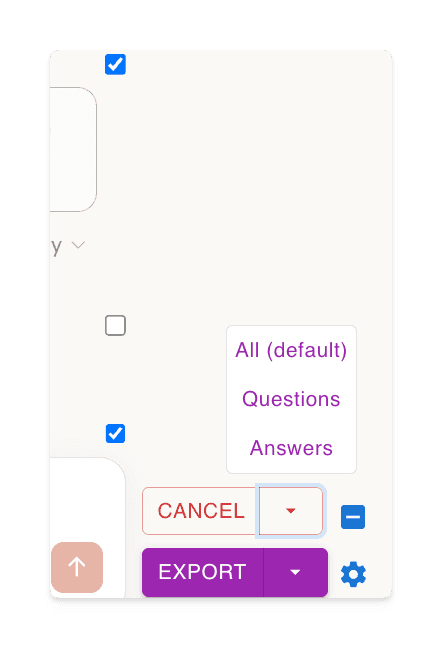
clique no botão 'Selecionar', depois escolha o que exportar
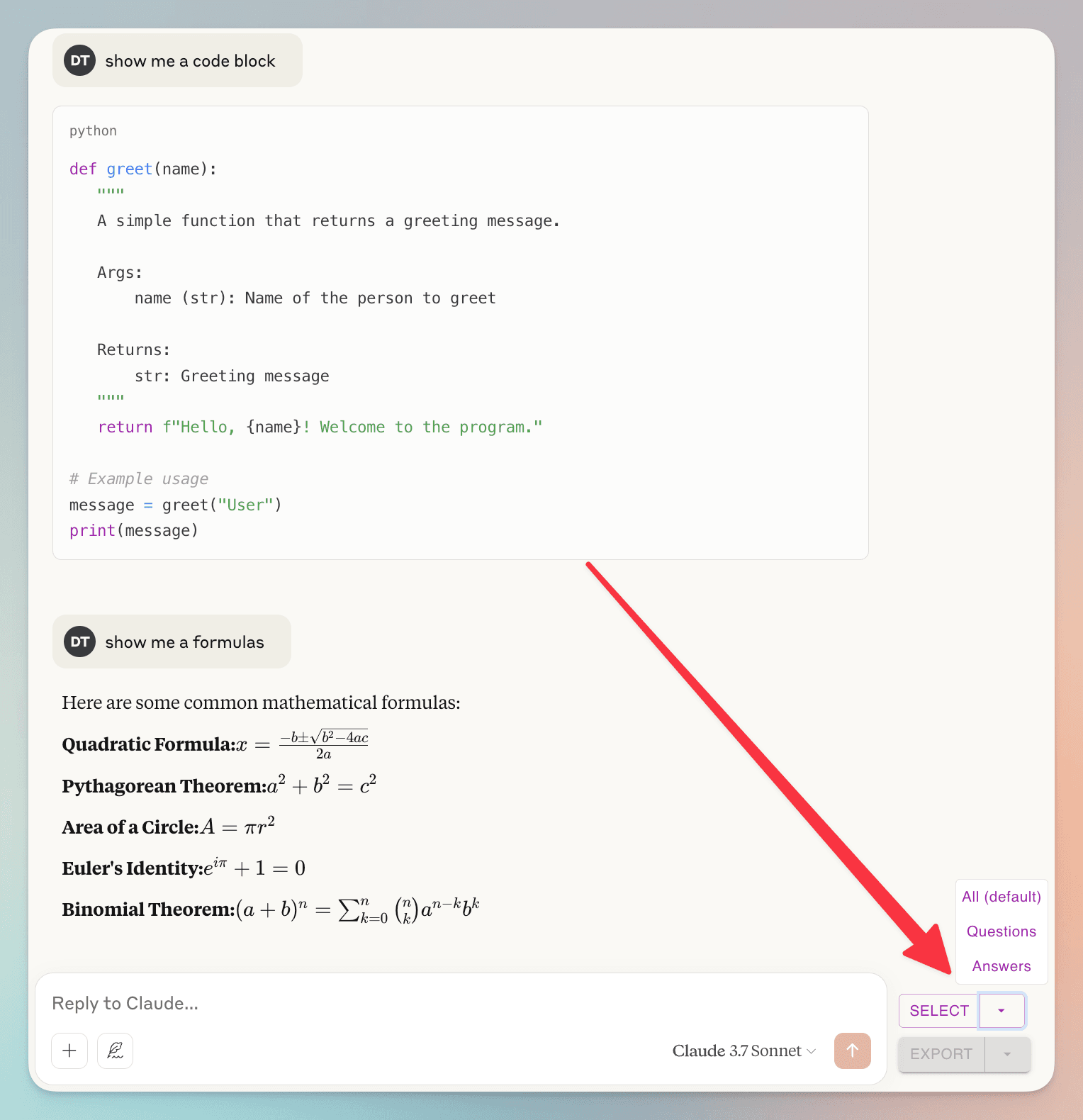
(un)check individual dialogs
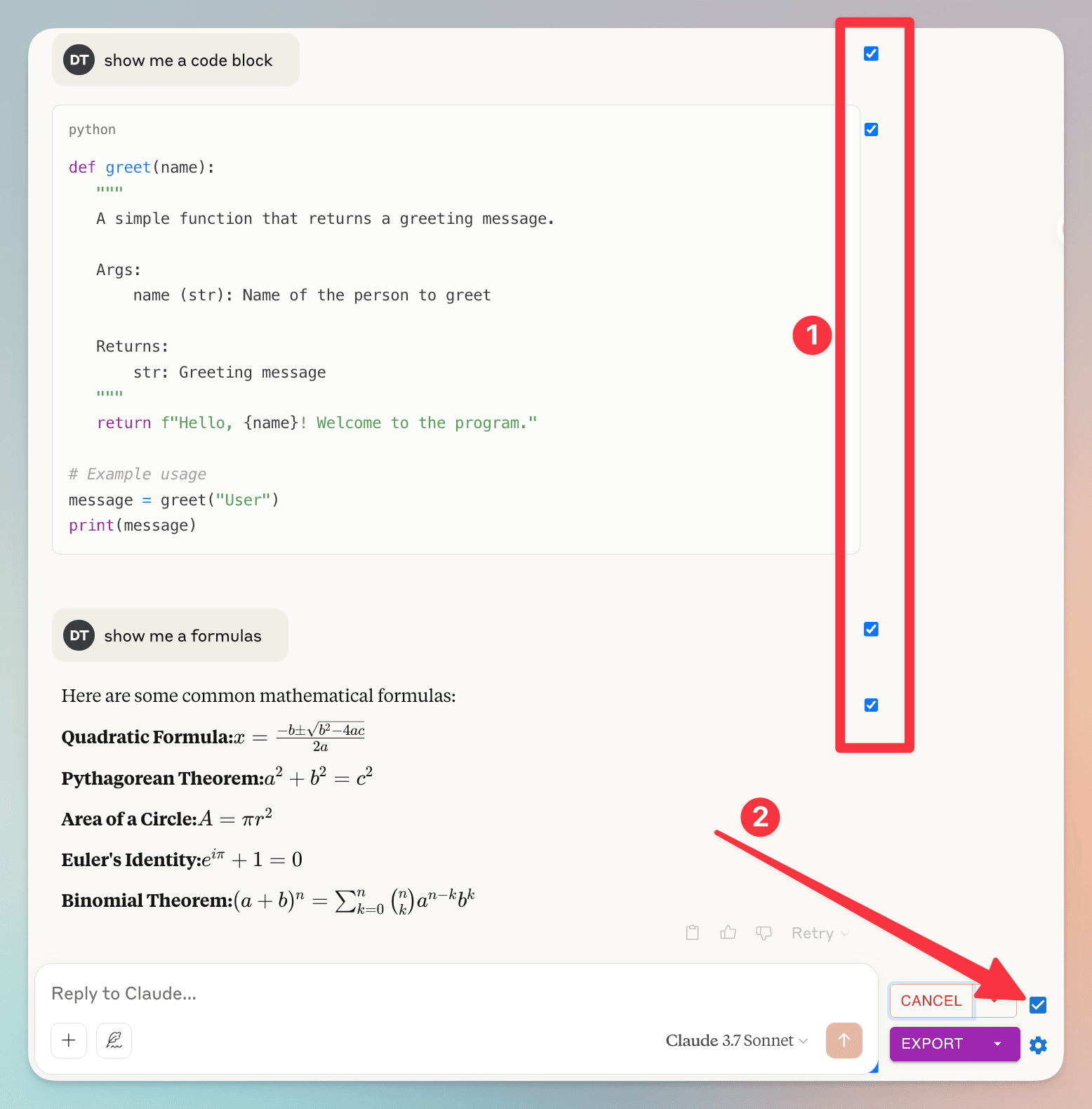
1. you can (un)check individual dialog
2. check/uncheck all dialog
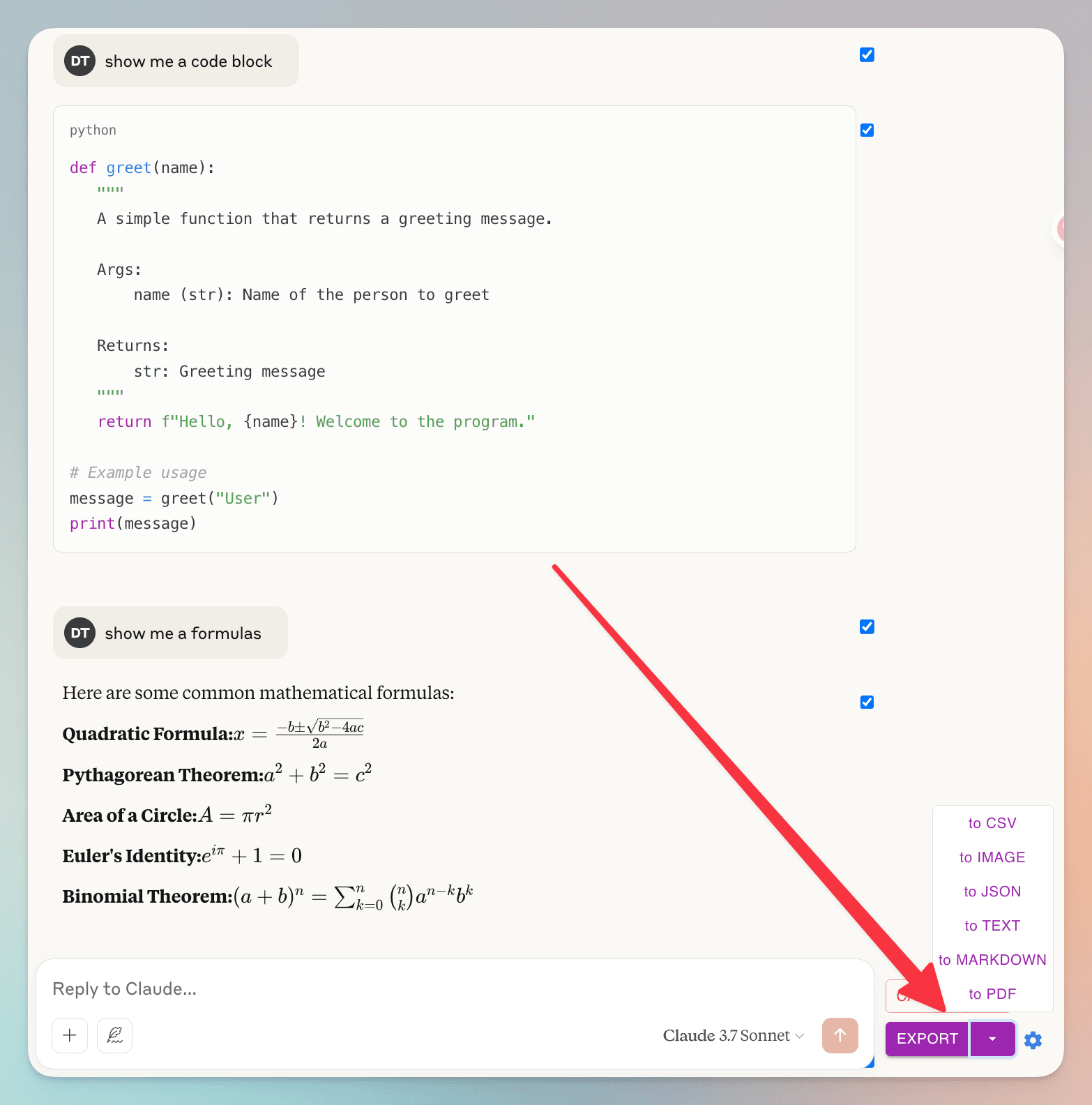
clique no botão 'Exportar', depois escolha o formato do arquivo
Perguntas Frequentes
Veja o que outros perguntam sobre o Exportador AI Grok
Posso exportar mensagens específicas da minha conversa?
Sim! Você pode selecionar mensagens individuais usando as caixas de seleção ao lado de cada mensagem. Por conveniência, também há uma caixa de seleção ao lado do botão 'Selecionar' para selecionar ou desmarcar rapidamente todas as mensagens de uma vez.
Como vocês lidam com meus dados de conversa? Tenho preocupações com privacidade.
Sua privacidade é nossa prioridade máxima. Não armazenamos nenhum dos seus dados de conversa. Quando você exporta para PDF, os dados são processados temporariamente em nossos servidores apenas para gerar o arquivo e são excluídos imediatamente depois. Todos os outros formatos de exportação (Markdown, Texto, JSON, CSV) são processados inteiramente dentro do seu navegador. Nunca armazenamos, analisamos ou compartilhamos seus dados de conversa.
Recursos Incríveis torne sua vida mais fácil
Baixe resultados do Grok como PDF, Markdown...
O Exportador AI Grok oferece formatos de arquivo versáteis. Exporte suas conversas do Grok em vários formatos, incluindo: PDF, Markdown, Texto (TXT), JSON e CSV.
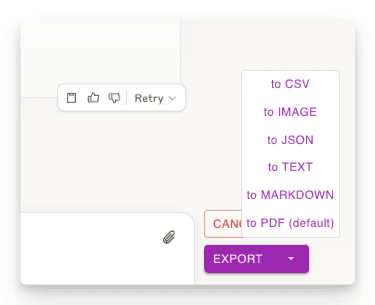
Exporte parte das conversas
Baixe apenas as partes da conversa que você precisa. Diferente de outros métodos, você não é forçado a baixar todo o chat - apenas selecione as respostas específicas que deseja!
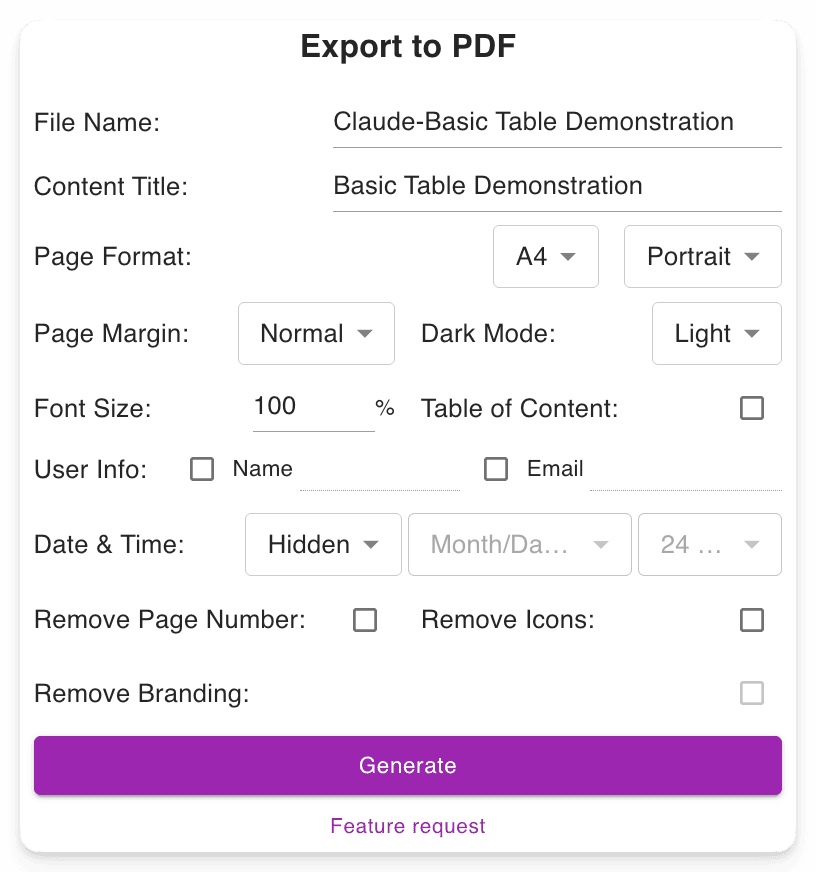
Configurações de download personalizáveis
Defina seu nome de arquivo preferido. Defina o título do conteúdo. Ajuste o formato PDF, escolha entre modo escuro ou claro sem alterar a interface do Grok. Inclui números de página para navegação mais fácil em PDFs longos.
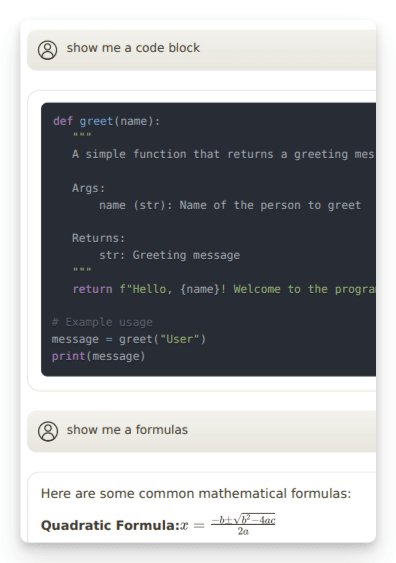
Preserva Saídas Avançadas
Mantém formatações importantes, como: Fórmulas matemáticas (bloco e inline). Blocos de código para desenvolvedores. Tabelas e conteúdo estruturado.
"Nice exporter"

"Wonderful and easy to use. The PDF exporter is excellent."

"Used the PDF tool and it worked well. The export to PDF tool Grok shows at the end of the convo only exports the last answer, not the entire conversation. With this tool you can select "all" which is a big time saver. Note, if you find that you are not getting all pages or an error message, try scrolling through the convo top to bottom, then save. I did have a couple issues that scrolling fixed for me."

"Finally something that works! Excellent!"

"好用的"

"It ACTUALLY works, highly recommended if you can't find a working exporter. EZ 5/5"

"Buenísima extensión para Grok."

"很好, 可以完整Export 整個對話, 是Grok 本身沒有的功能"

"Simple of use! Exectry what we do need! Very good product, congrats, congrats, congrats!"

"Works nicely."

"Simple and effective. Excellent helper app."

"非常好 ,好得沒得挑剔 ,尤其大量文字對話上幫助我儲存內容 ,讓我後續有靈感時最大發揮!!"

"Works perfectly, no fuss, rare nowadays, 5 stars!!!"

"Amazing tool, lifesaver, so easy!"

"simplemente practico, 10/10"

"I tried 4 diffferent extensions to export Grok to PDF. This was be far the best (and the pdf export is only in beta!)"

"I suppose I should really have used it for longer but already I am impressed. I have not compared it with others but it is simple which to myself is important. If you have not tried a Grok exporter before then certainly try this first because it is so simple. I got my install and learn time back within a few minutes. After installing you need to refresh he grok screen for the extension to start working. I like printing at 75% so maybe try that and see what you think. There is - well to me - a little logic quirk in that if you want to select individual blocks - say just the last one of maybe 30 - you first have to select all - then a bit appears at the side - where you can unselect all - er wrong logic to me - and then you can manually select just the last block. I didn't notice it at first but IMO it would be better to have this on the first selection. Now I know it will be fine."

"It's just amazing! The best IA chat exporter."

"Exports chats accurately into Pdf and Markdown txt (not used other formats). Very usefull for offline reading."

"inpressed allready with the features"

"Super impressed with this Grok Exporter. The PDF formatting was spot on. Easy to install. Navigation was simple. Very thankful for this being developed."

"I often forget to go back and write reviews on applications that I like but the pop up after each use kept reminding me LOL This extension is absolutely AMAZING It's improved my work flow dramatically and helped me plug a leak of information that I'd just been ignoring until recently. Thank you so much for this"

"Seems to work well. It would nice to be able to pay some cash and get the ads removed from the output."

"Works great and formatting looks good!"

"Still trying to figure out how to use it. I usually use Grok from X. I guess I have to go to a different Grok page?"

"Süper uygulama emeği geçenlere teşekkür ederim.Artık sohbetlerimi arşivleyebileceğim.5 yıldız değil 10 yıldızı hakkediyor,"

"Works"

"Absolutely Awesome!"

"Perfect! Just what I was looking for!! Great Job!"

"NIce work guys, keep improving it."

Pronto para mergulhar?
Instale o Exportador AI Grok agora.
Aumente sua produtividade com a ferramenta definitiva para baixar resultados do Grok nos formatos PDF, Markdown, Texto, JSON ou CSV.