
Grok 대화를 PDF, Markdown, 텍스트, CSV 및 JSON 형식으로 무료로 내보내고 저장하세요. Grok 결과를 PDF 로 다운로드. Grok 를 아름다운 PDF 로 쉽게 변환하세요.
사용 방법을 따라하세요 AI Grok 익스포터 브라우저 확장 프로그램
grok.com 열기
내보내고 싶은 대화로 이동하기
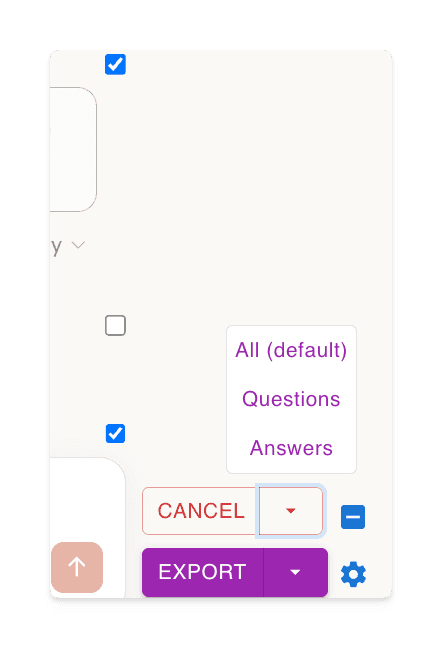
‘선택‘버튼을 클릭한 후 내보낼 항목을 선택하세요
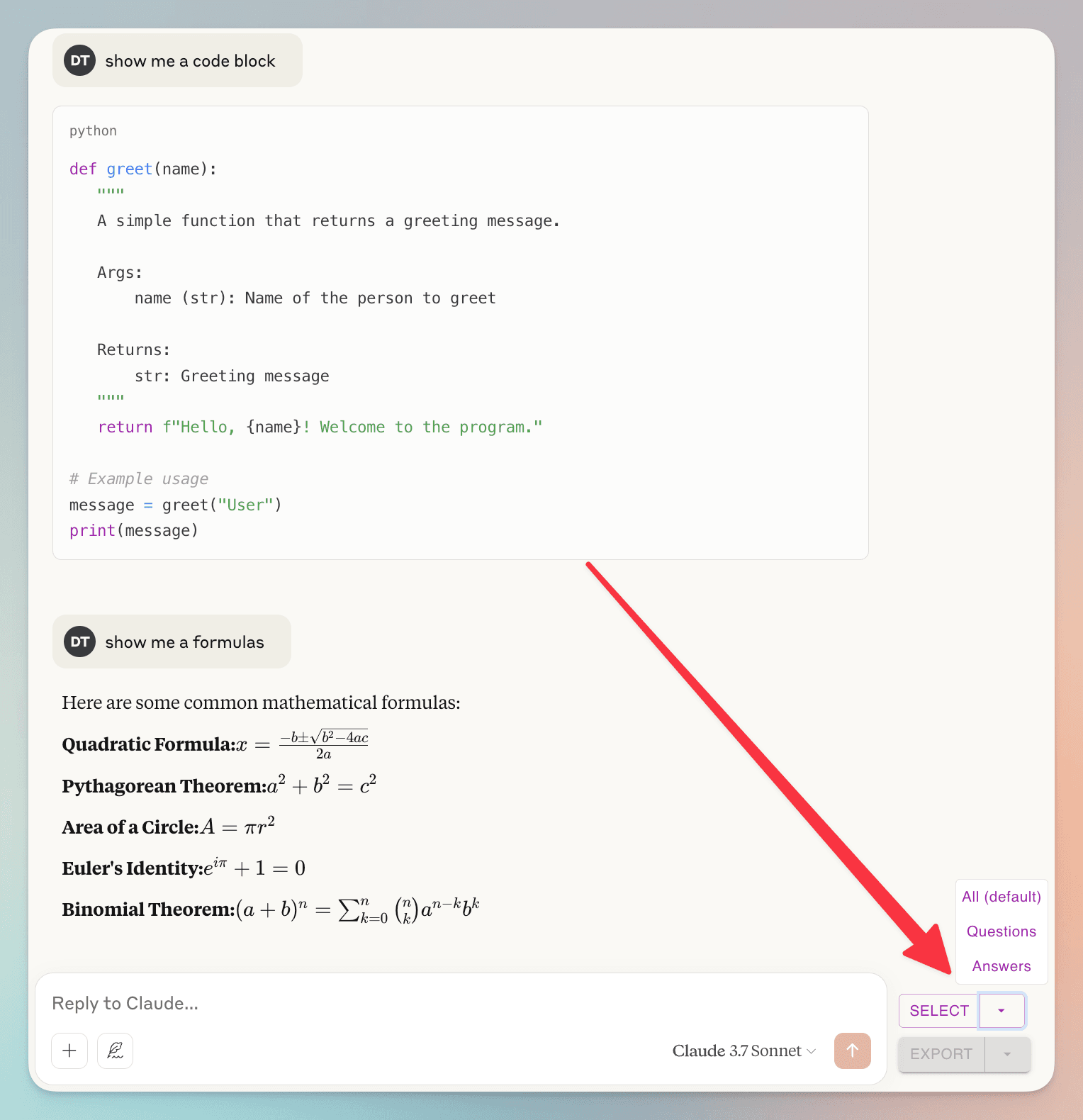
(un)check individual dialogs
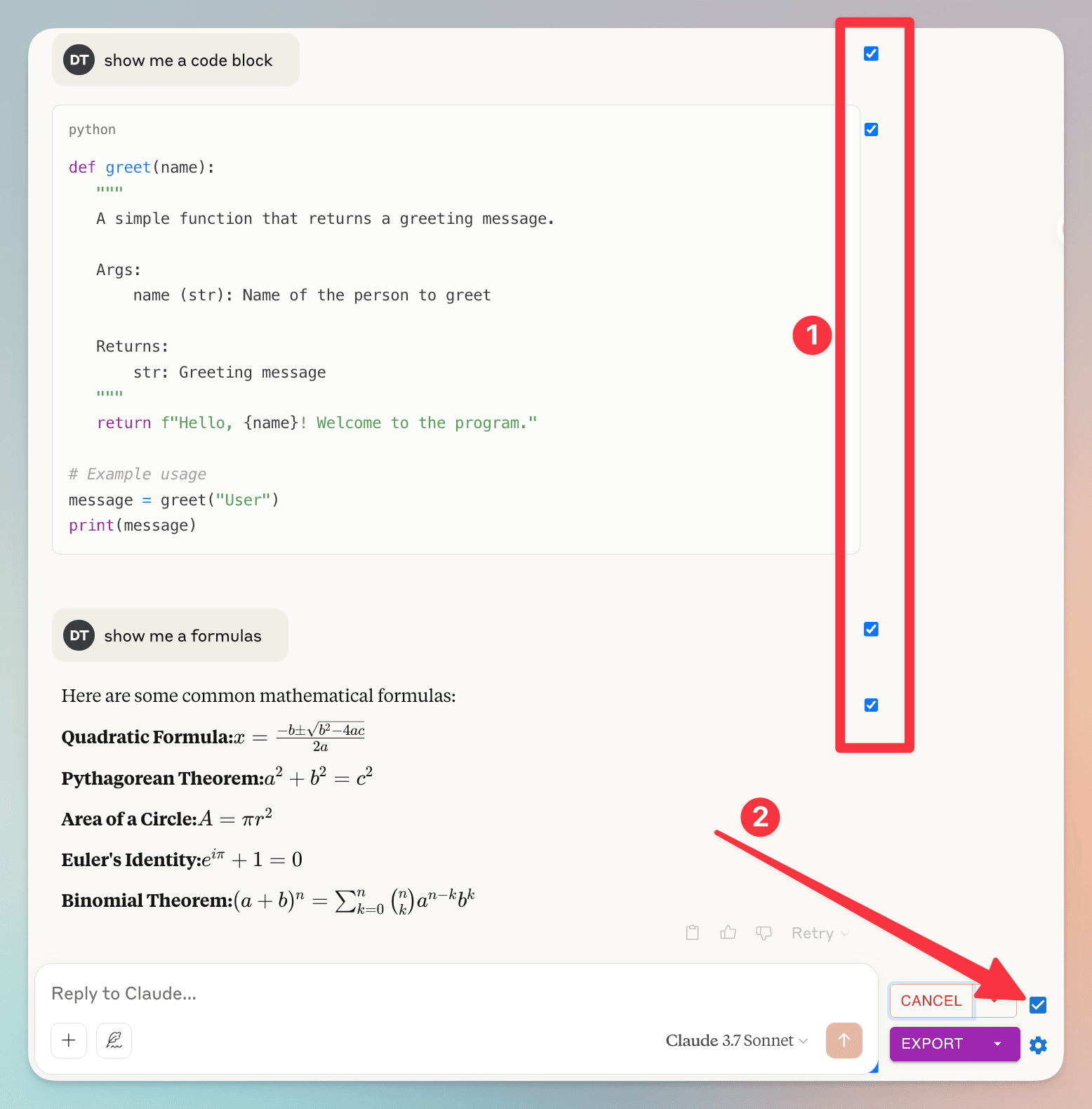
1. you can (un)check individual dialog
2. check/uncheck all dialog
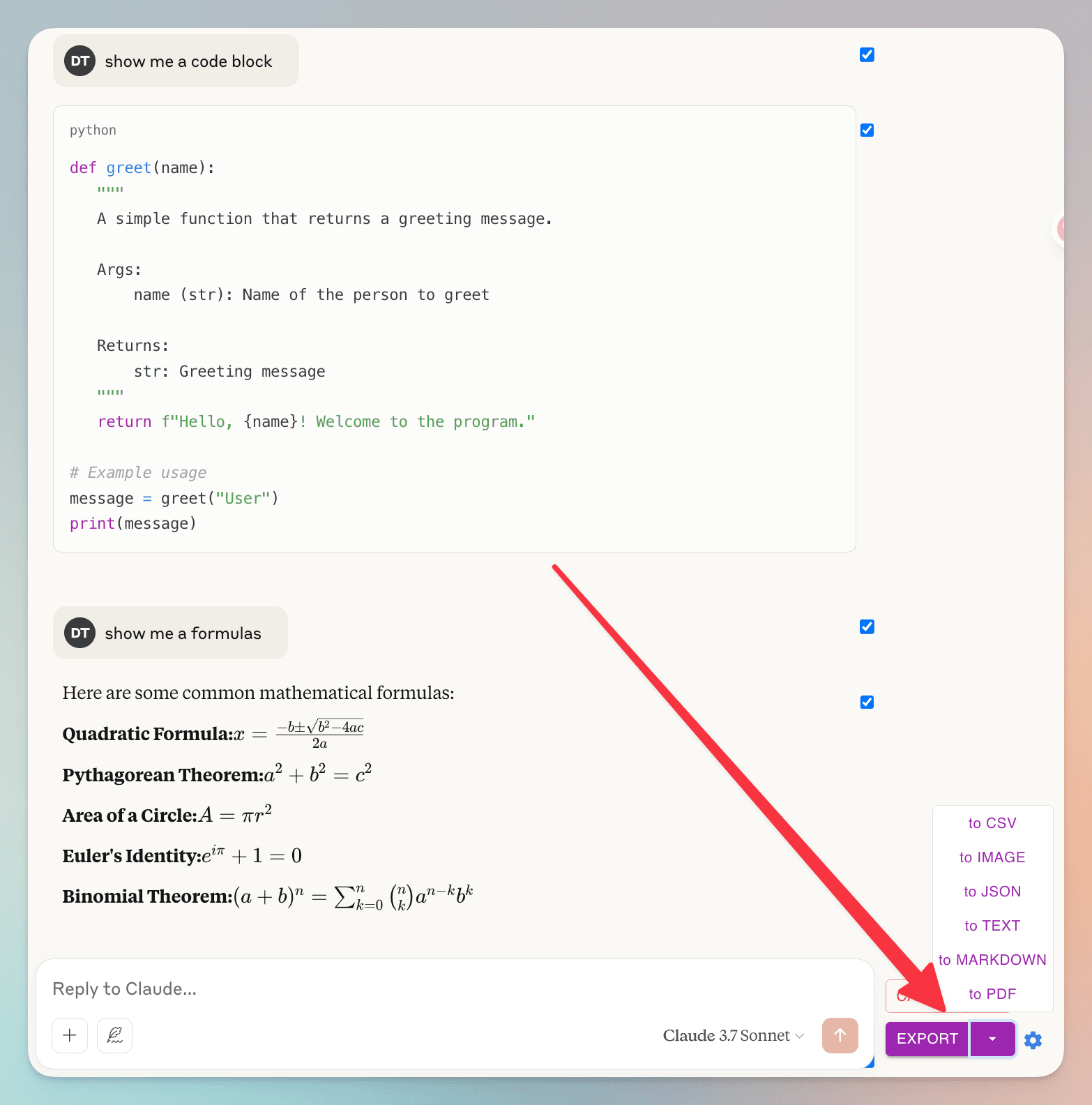
‘내보내기‘버튼을 클릭한 후 파일 형식을 선택하세요
자주 묻는 질문
AI Grok 익스포터에 대해 다른 사람들이 궁금해하는 점을 확인하세요
대화에서 특정 메시지만 내보낼 수 있나요?
네! 각 메시지 옆의 체크박스를 사용하여 개별 메시지를 선택할 수 있습니다. 편의를 위해 '선택' 버튼 옆에도 체크박스가 있어 모든 메시지를 빠르게 선택하거나 선택 해제할 수 있습니다.
대화 데이터는 어떻게 처리되나요? 개인정보 보호에 대한 우려가 있습니다.
개인정보 보호는 최우선 과제입니다. 대화 데이터는 전혀 저장하지 않습니다. PDF 로 내보낼 때는 파일을 생성하기 위해 서버에서 일시적으로만 처리되며, 완료 후 즉시 삭제됩니다. 다른 모든 내보내기 형식 (Markdown, 텍스트, JSON, CSV) 은 브라우저 내에서 완전히 처리됩니다. 대화 데이터를 저장, 분석 또는 공유하지 않습니다.
놀라운 기능 더 쉬운 생활을 위해
Grok 결과를 PDF, Markdown 등으로 다운로드
AI Grok 익스포터는 다양한 파일 형식을 지원합니다. Grok 대화를 PDF, Markdown, 텍스트 (TXT), JSON, CSV 등 여러 형식으로 내보낼 수 있습니다.
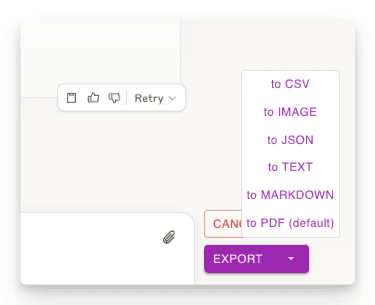
대화의 일부만 내보내기
필요한 대화 부분만 다운로드하세요. 다른 방법과 달리 전체 대화를 다운로드할 필요가 없습니다 - 원하는 응답만 선택하세요!
맞춤 설정 가능한 다운로드 설정
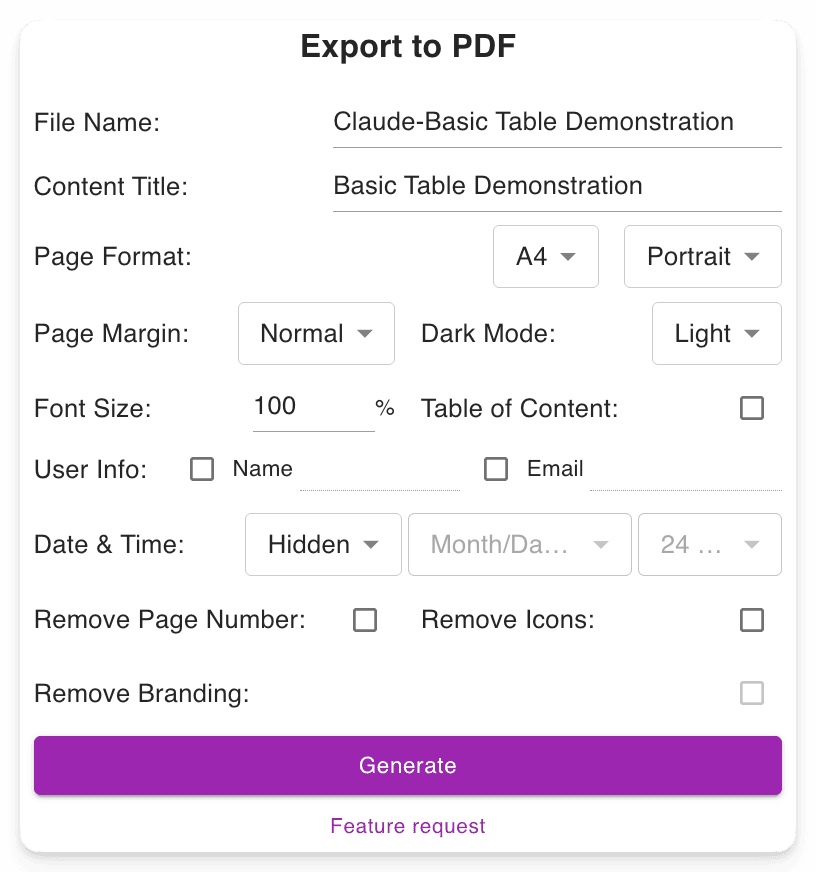
파일 이름을 설정하세요. 콘텐츠 제목을 정의하세요. PDF 형식을 조정하고, Grok 인터페이스를 변경하지 않고 다크 모드나 라이트 모드를 선택하세요. 긴 PDF 에서 쉽게 탐색할 수 있도록 페이지 번호를 포함합니다.
고급 출력 보존
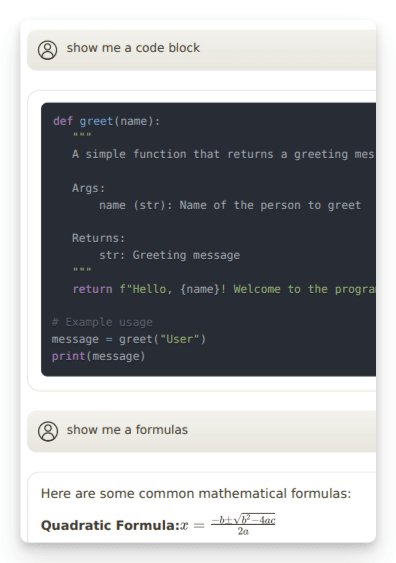
중요한 형식을 보존합니다: 수학 공식 (블록 및 인라인). 개발자를 위한 코드 블록. 표와 구조화된 콘텐츠.
"Nice exporter"

"Wonderful and easy to use. The PDF exporter is excellent."

"Used the PDF tool and it worked well. The export to PDF tool Grok shows at the end of the convo only exports the last answer, not the entire conversation. With this tool you can select "all" which is a big time saver. Note, if you find that you are not getting all pages or an error message, try scrolling through the convo top to bottom, then save. I did have a couple issues that scrolling fixed for me."

"Finally something that works! Excellent!"

"好用的"

"It ACTUALLY works, highly recommended if you can't find a working exporter. EZ 5/5"

"Buenísima extensión para Grok."

"很好, 可以完整Export 整個對話, 是Grok 本身沒有的功能"

"Simple of use! Exectry what we do need! Very good product, congrats, congrats, congrats!"

"Works nicely."

"Simple and effective. Excellent helper app."

"非常好 ,好得沒得挑剔 ,尤其大量文字對話上幫助我儲存內容 ,讓我後續有靈感時最大發揮!!"

"Works perfectly, no fuss, rare nowadays, 5 stars!!!"

"Amazing tool, lifesaver, so easy!"

"simplemente practico, 10/10"

"I tried 4 diffferent extensions to export Grok to PDF. This was be far the best (and the pdf export is only in beta!)"

"I suppose I should really have used it for longer but already I am impressed. I have not compared it with others but it is simple which to myself is important. If you have not tried a Grok exporter before then certainly try this first because it is so simple. I got my install and learn time back within a few minutes. After installing you need to refresh he grok screen for the extension to start working. I like printing at 75% so maybe try that and see what you think. There is - well to me - a little logic quirk in that if you want to select individual blocks - say just the last one of maybe 30 - you first have to select all - then a bit appears at the side - where you can unselect all - er wrong logic to me - and then you can manually select just the last block. I didn't notice it at first but IMO it would be better to have this on the first selection. Now I know it will be fine."

"It's just amazing! The best IA chat exporter."

"Exports chats accurately into Pdf and Markdown txt (not used other formats). Very usefull for offline reading."

"inpressed allready with the features"

"Super impressed with this Grok Exporter. The PDF formatting was spot on. Easy to install. Navigation was simple. Very thankful for this being developed."

"I often forget to go back and write reviews on applications that I like but the pop up after each use kept reminding me LOL This extension is absolutely AMAZING It's improved my work flow dramatically and helped me plug a leak of information that I'd just been ignoring until recently. Thank you so much for this"

"Seems to work well. It would nice to be able to pay some cash and get the ads removed from the output."

"Works great and formatting looks good!"

"Still trying to figure out how to use it. I usually use Grok from X. I guess I have to go to a different Grok page?"

"Süper uygulama emeği geçenlere teşekkür ederim.Artık sohbetlerimi arşivleyebileceğim.5 yıldız değil 10 yıldızı hakkediyor,"

"Works"

"Absolutely Awesome!"

"Perfect! Just what I was looking for!! Great Job!"

"NIce work guys, keep improving it."

지금 시작할 준비 되셨나요?
AI Grok 익스포터을 (를) 지금 설치하세요.
Grok 결과를 PDF, Markdown, 텍스트, JSON 또는 CSV 형식으로 다운로드할 수 있는 궁극적인 도구로 생산성을 향상시키세요.