
Esporta e salva gratuitamente le conversazioni Grok come PDF, Markdown, Testo, CSV e JSON. Scarica i risultati di Grok in PDF. Converti facilmente Grok in bellissimi PDF.
Segui i passaggi per usare Estensione browser Esportatore AI Grok
apri grok.com
naviga verso le conversazioni che vuoi esportare
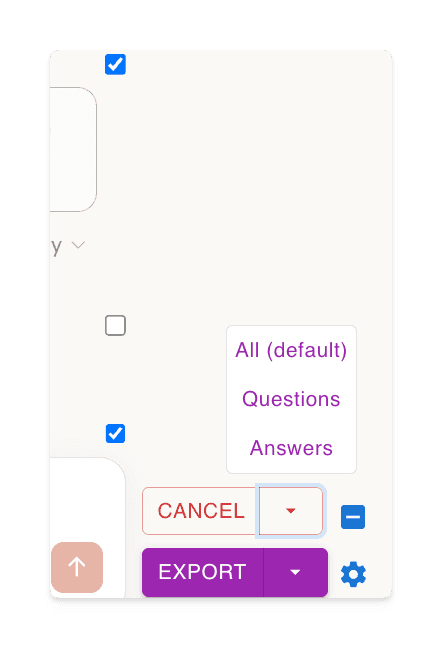
clicca sul pulsante 'Seleziona', poi scegli cosa esportare
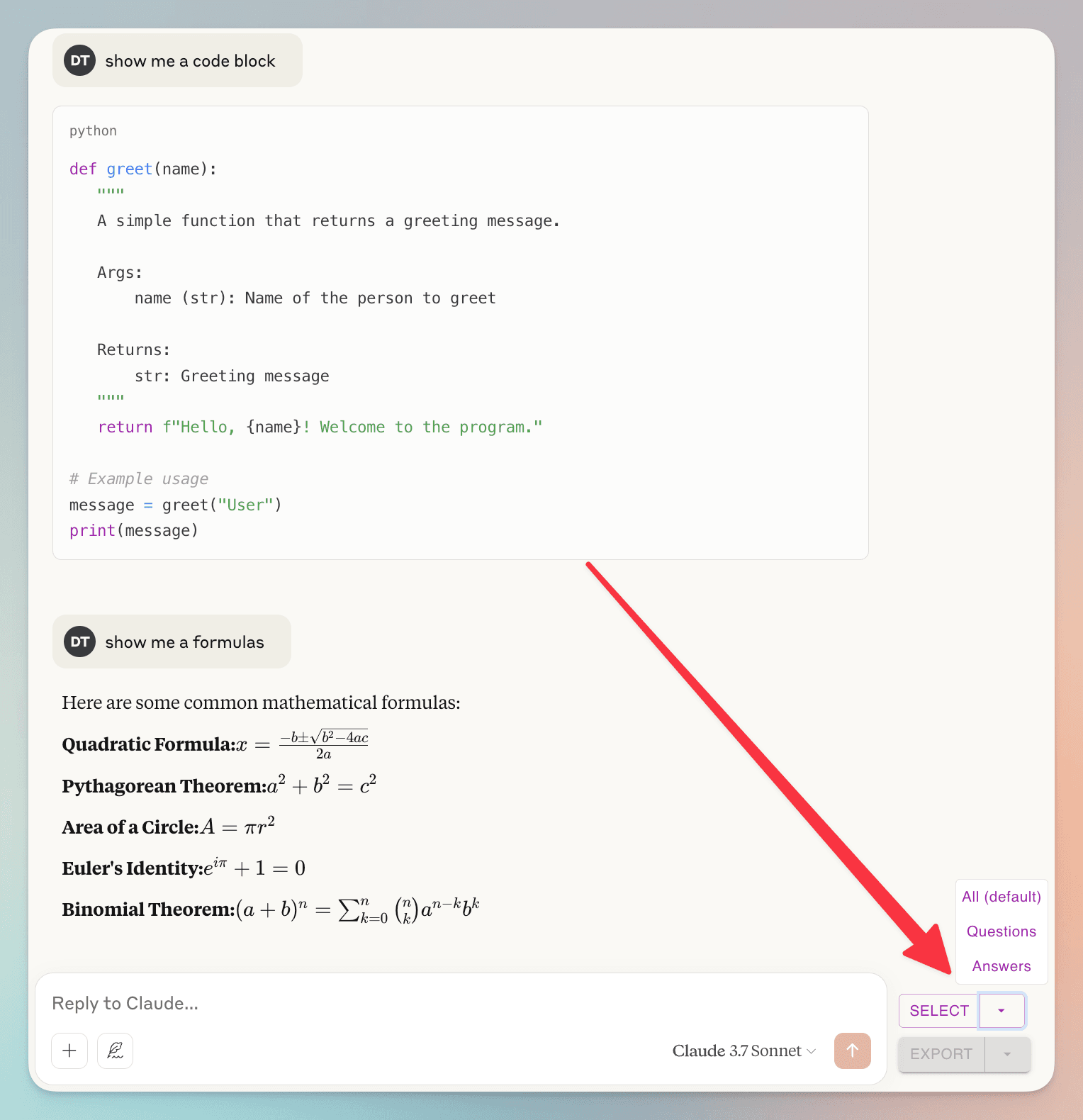
(un)check individual dialogs
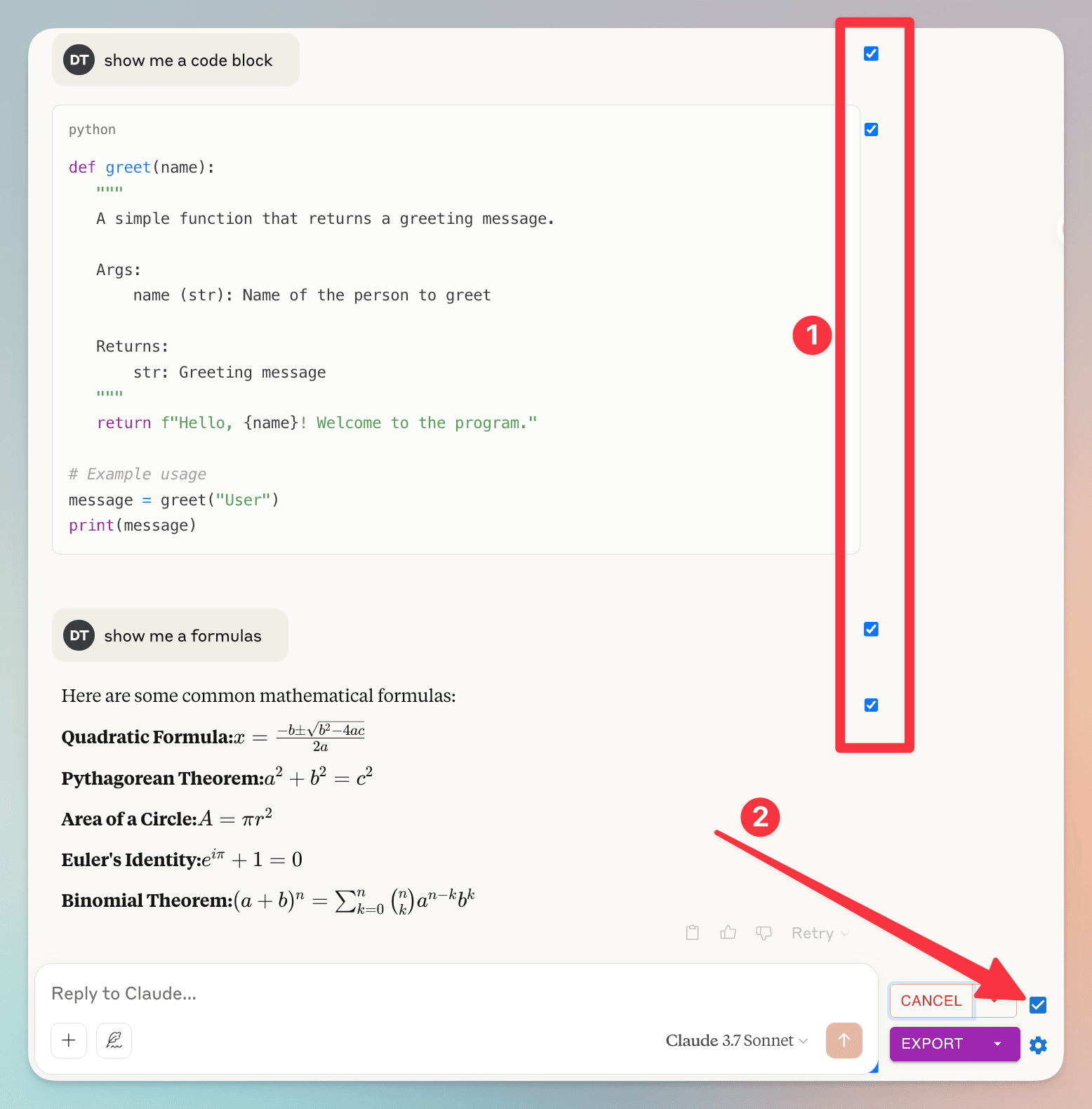
1. you can (un)check individual dialog
2. check/uncheck all dialog
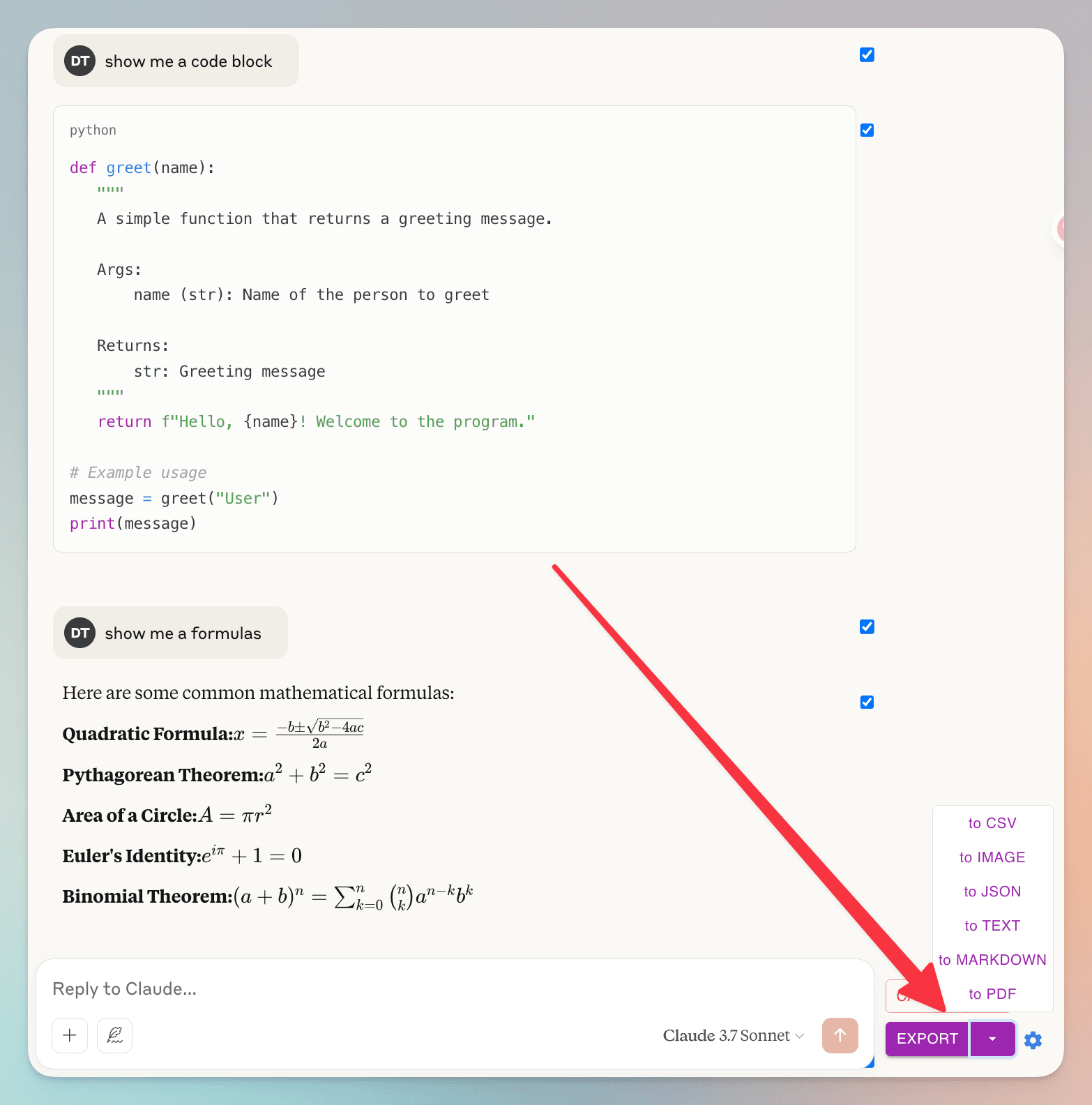
clicca sul pulsante 'Esporta', poi scegli il formato del file
Domande Frequenti
Scopri cosa chiedono gli altri su Esportatore AI Grok
Posso esportare messaggi specifici dalla mia conversazione?
Sì! Puoi selezionare singoli messaggi utilizzando le caselle di controllo accanto a ogni messaggio. Per comodità, c'è anche una casella di controllo accanto al pulsante 'Seleziona' per selezionare o deselezionare rapidamente tutti i messaggi contemporaneamente.
Come gestite i miei dati di conversazione? Ho preoccupazioni sulla privacy.
La tua privacy è la nostra massima priorità. Non memorizziamo nessuno dei tuoi dati di conversazione. Quando esporti in PDF, i dati vengono elaborati temporaneamente sui nostri server solo per generare il file e vengono eliminati immediatamente dopo. Tutti gli altri formati di esportazione (Markdown, Testo, JSON, CSV) vengono elaborati interamente all'interno del tuo browser. Non memorizziamo, analizziamo o condividiamo mai i tuoi dati di conversazione.
Funzionalità Straordinarie rendi la tua vita più facile
Scarica i risultati di Grok come PDF, Markdown...
Esportatore AI Grok supporta vari formati di file. Esporta le tue conversazioni Grok in più formati, tra cui: PDF, Markdown, Testo (TXT), JSON e CSV.
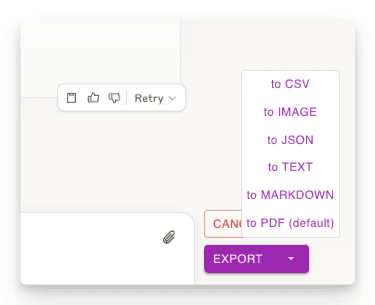
Esporta parte delle conversazioni
Scarica solo le parti della conversazione di cui hai bisogno. A differenza di altri metodi, non sei costretto a scaricare l'intera chat - seleziona solo le risposte specifiche che desideri!
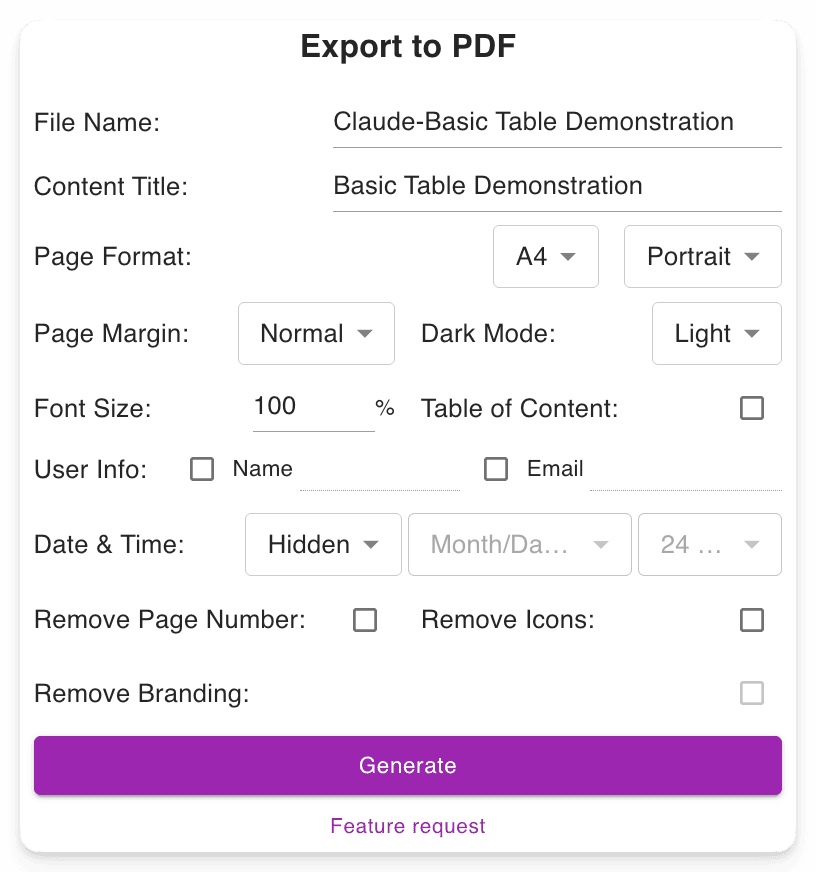
Impostazioni di download personalizzabili
Imposta il nome del file preferito. Definisci il titolo del contenuto. Regola il formato PDF, scegli tra modalità scura o chiara senza alterare l'interfaccia di Grok. Include numeri di pagina per una navigazione più facile nei PDF lunghi.
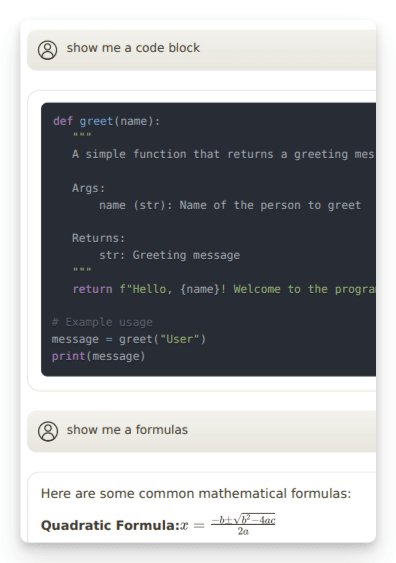
Preserva Output Avanzati
Mantiene le formattazioni importanti, come: Formule matematiche (blocco e inline). Blocchi di codice per sviluppatori. Tabelle e contenuti strutturati.
"Nice exporter"

"Wonderful and easy to use. The PDF exporter is excellent."

"Used the PDF tool and it worked well. The export to PDF tool Grok shows at the end of the convo only exports the last answer, not the entire conversation. With this tool you can select "all" which is a big time saver. Note, if you find that you are not getting all pages or an error message, try scrolling through the convo top to bottom, then save. I did have a couple issues that scrolling fixed for me."

"Finally something that works! Excellent!"

"好用的"

"It ACTUALLY works, highly recommended if you can't find a working exporter. EZ 5/5"

"Buenísima extensión para Grok."

"很好, 可以完整Export 整個對話, 是Grok 本身沒有的功能"

"Simple of use! Exectry what we do need! Very good product, congrats, congrats, congrats!"

"Works nicely."

"Simple and effective. Excellent helper app."

"非常好 ,好得沒得挑剔 ,尤其大量文字對話上幫助我儲存內容 ,讓我後續有靈感時最大發揮!!"

"Works perfectly, no fuss, rare nowadays, 5 stars!!!"

"Amazing tool, lifesaver, so easy!"

"simplemente practico, 10/10"

"I tried 4 diffferent extensions to export Grok to PDF. This was be far the best (and the pdf export is only in beta!)"

"I suppose I should really have used it for longer but already I am impressed. I have not compared it with others but it is simple which to myself is important. If you have not tried a Grok exporter before then certainly try this first because it is so simple. I got my install and learn time back within a few minutes. After installing you need to refresh he grok screen for the extension to start working. I like printing at 75% so maybe try that and see what you think. There is - well to me - a little logic quirk in that if you want to select individual blocks - say just the last one of maybe 30 - you first have to select all - then a bit appears at the side - where you can unselect all - er wrong logic to me - and then you can manually select just the last block. I didn't notice it at first but IMO it would be better to have this on the first selection. Now I know it will be fine."

"It's just amazing! The best IA chat exporter."

"Exports chats accurately into Pdf and Markdown txt (not used other formats). Very usefull for offline reading."

"inpressed allready with the features"

"Super impressed with this Grok Exporter. The PDF formatting was spot on. Easy to install. Navigation was simple. Very thankful for this being developed."

"I often forget to go back and write reviews on applications that I like but the pop up after each use kept reminding me LOL This extension is absolutely AMAZING It's improved my work flow dramatically and helped me plug a leak of information that I'd just been ignoring until recently. Thank you so much for this"

"Seems to work well. It would nice to be able to pay some cash and get the ads removed from the output."

"Works great and formatting looks good!"

"Still trying to figure out how to use it. I usually use Grok from X. I guess I have to go to a different Grok page?"

"Süper uygulama emeği geçenlere teşekkür ederim.Artık sohbetlerimi arşivleyebileceğim.5 yıldız değil 10 yıldızı hakkediyor,"

"Works"

"Absolutely Awesome!"

"Perfect! Just what I was looking for!! Great Job!"

"NIce work guys, keep improving it."

Pronto a tuffarti?
Installa Esportatore AI Grok ora.
Aumenta la tua produttività con lo strumento definitivo per scaricare i risultati di Grok come PDF, Markdown, Testo, JSON o CSV.