
Exportieren und speichern Sie Grok-Gespräche kostenlos als PDF, Markdown, Text, CSV und JSON. Laden Sie Grok-Ergebnisse als PDF herunter. Konvertieren Sie Grok einfach in schöne PDFs.
Folgen Sie den Schritten zur Nutzung AI Grok-Exporter Browser-Erweiterung
Öffnen Sie grok.com
Navigieren Sie zu den Unterhaltungen, die Sie exportieren möchten
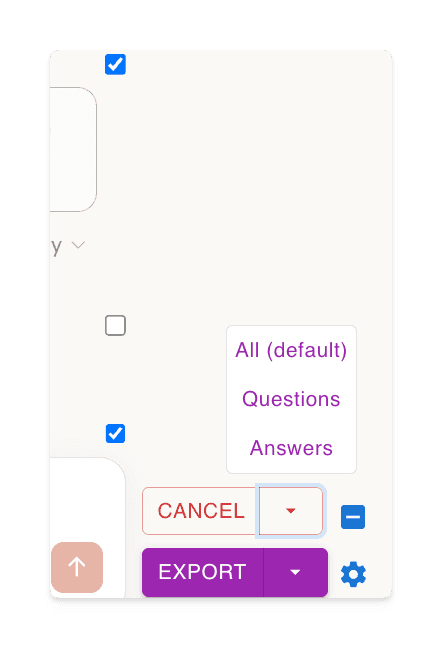
Klicken Sie auf die Schaltfläche „Auswählen“ und wählen Sie aus, was exportiert werden soll
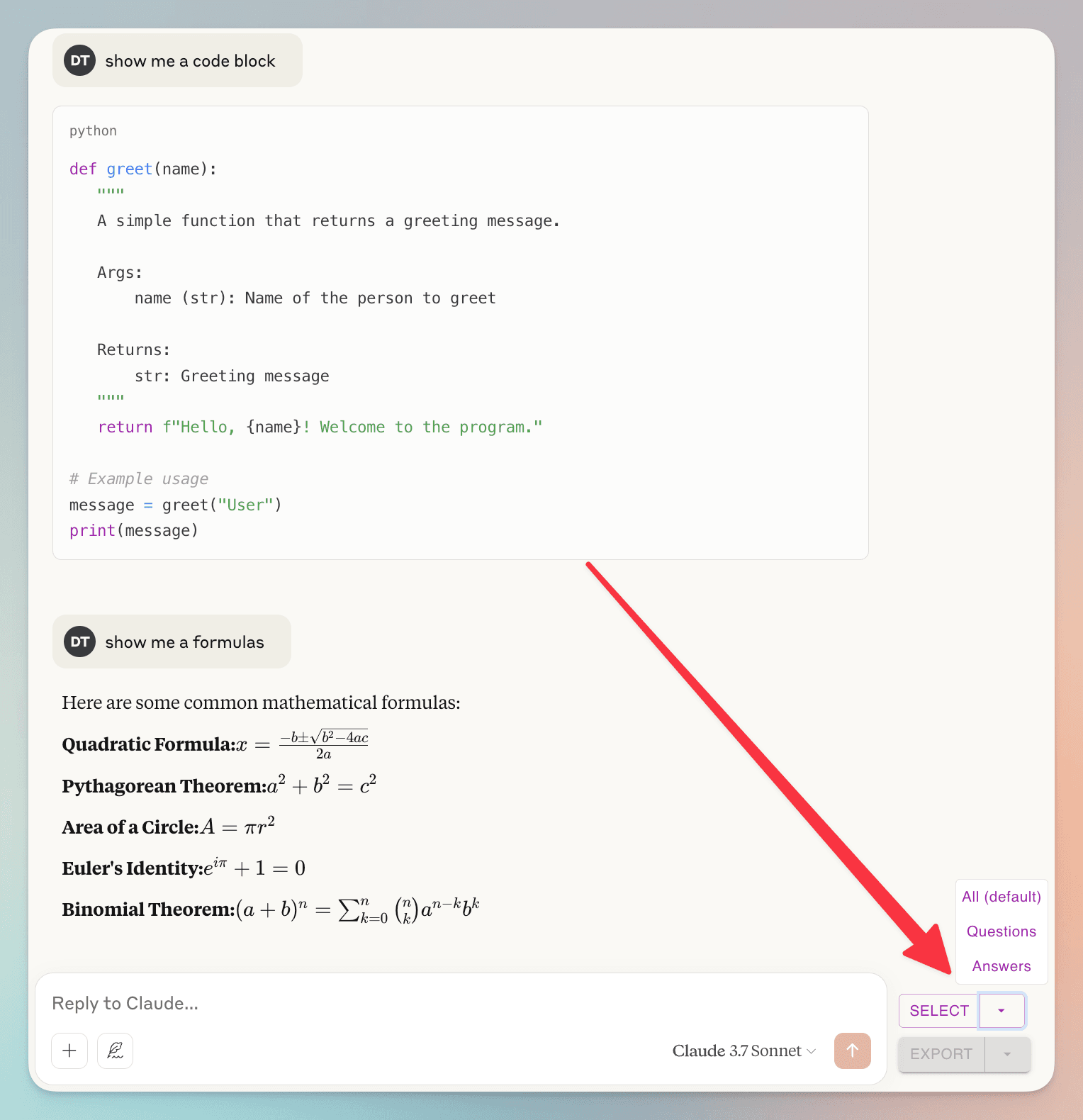
(un)check individual dialogs
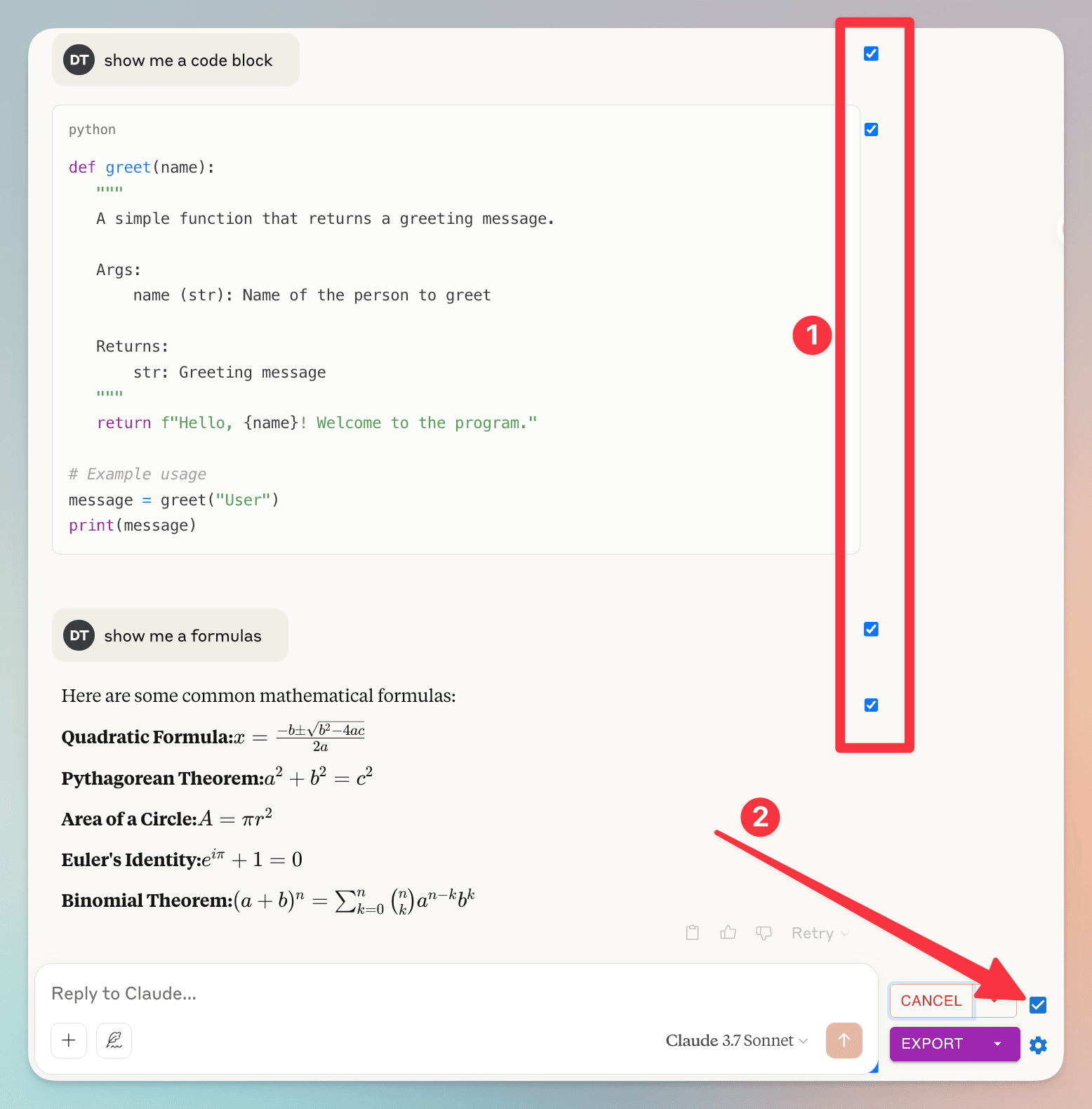
1. you can (un)check individual dialog
2. check/uncheck all dialog
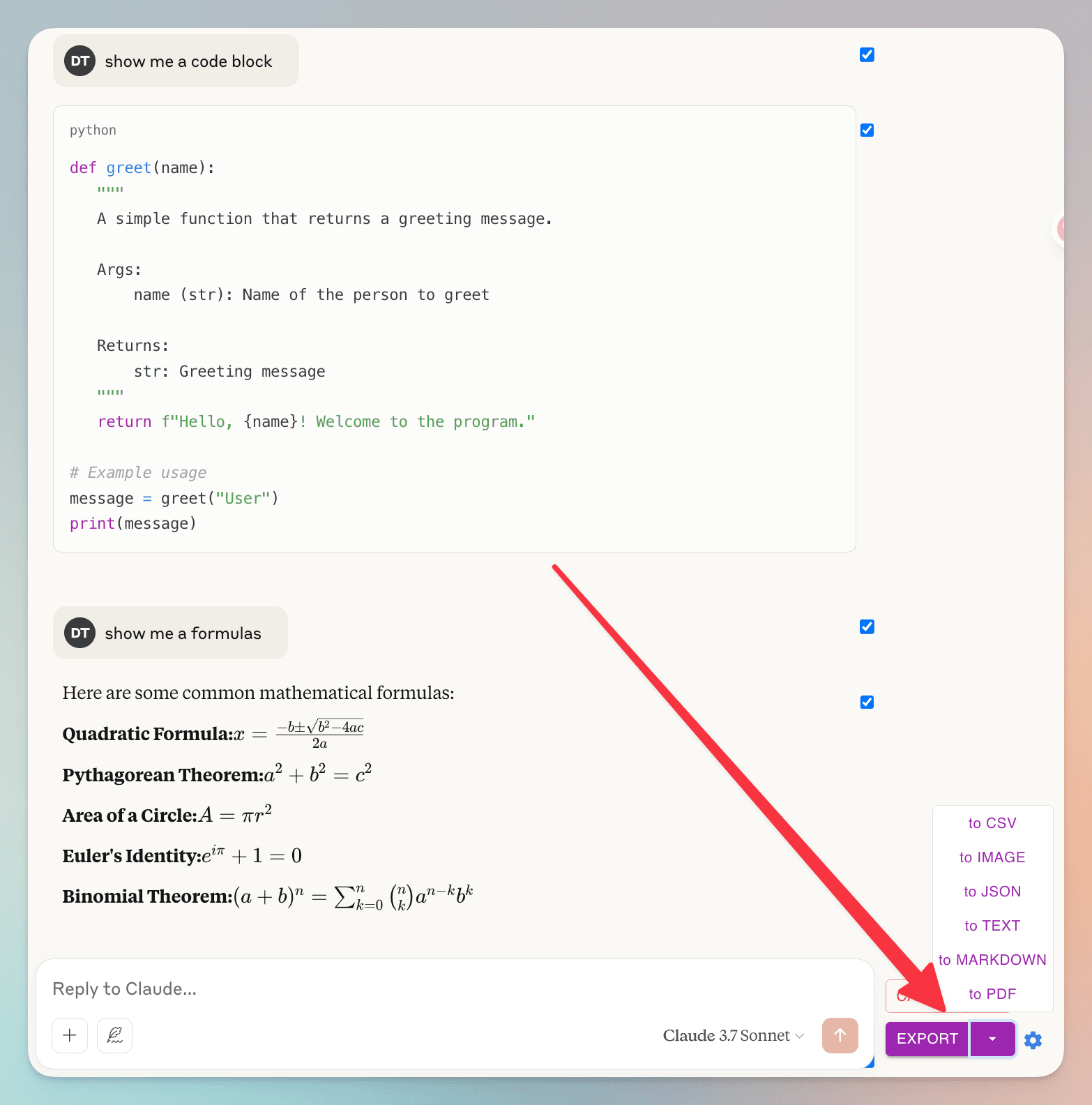
Klicken Sie auf die Schaltfläche „Exportieren“ und wählen Sie das Dateiformat aus
Häufig gestellte Fragen
Sehen Sie, was andere über AI Grok-Exporter wissen möchten
Kann ich bestimmte Nachrichten aus meinem Gespräch exportieren?
Ja! Sie können einzelne Nachrichten mit den Kontrollkästchen neben jeder Nachricht auswählen. Zur Bequemlichkeit gibt es auch ein Kontrollkästchen neben der Schaltfläche 'Auswählen', um schnell alle Nachrichten auf einmal auszuwählen oder abzuwählen.
Wie gehen Sie mit meinen Gesprächsdaten um? Ich habe Bedenken bezüglich des Datenschutzes.
Ihre Privatsphäre hat für uns höchste Priorität. Wir speichern keine Ihrer Gesprächsdaten. Wenn Sie als PDF exportieren, werden die Daten nur vorübergehend auf unseren Servern verarbeitet, um die Datei zu generieren, und werden sofort danach gelöscht. Alle anderen Exportformate (Markdown, Text, JSON, CSV) werden vollständig in Ihrem Browser verarbeitet. Wir speichern, analysieren oder teilen Ihre Gesprächsdaten niemals.
Großartige Funktionen Machen Sie Ihr Leben einfacher
Grok-Ergebnisse als PDF, Markdown usw. herunterladen
AI Grok-Exporter unterstützt vielseitige Dateiformate. Exportieren Sie Ihre Grok-Unterhaltungen in verschiedenen Formaten, einschließlich: PDF, Markdown, Text (TXT), JSON und CSV.
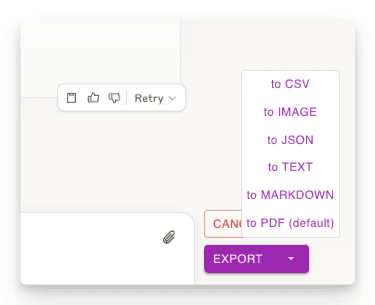
Teile der Gespräche exportieren
Laden Sie nur die benötigten Gesprächsteile herunter. Anders als bei anderen Methoden müssen Sie nicht den gesamten Chat herunterladen - wählen Sie einfach die gewünschten Antworten aus!
Anpassbare Download-Einstellungen
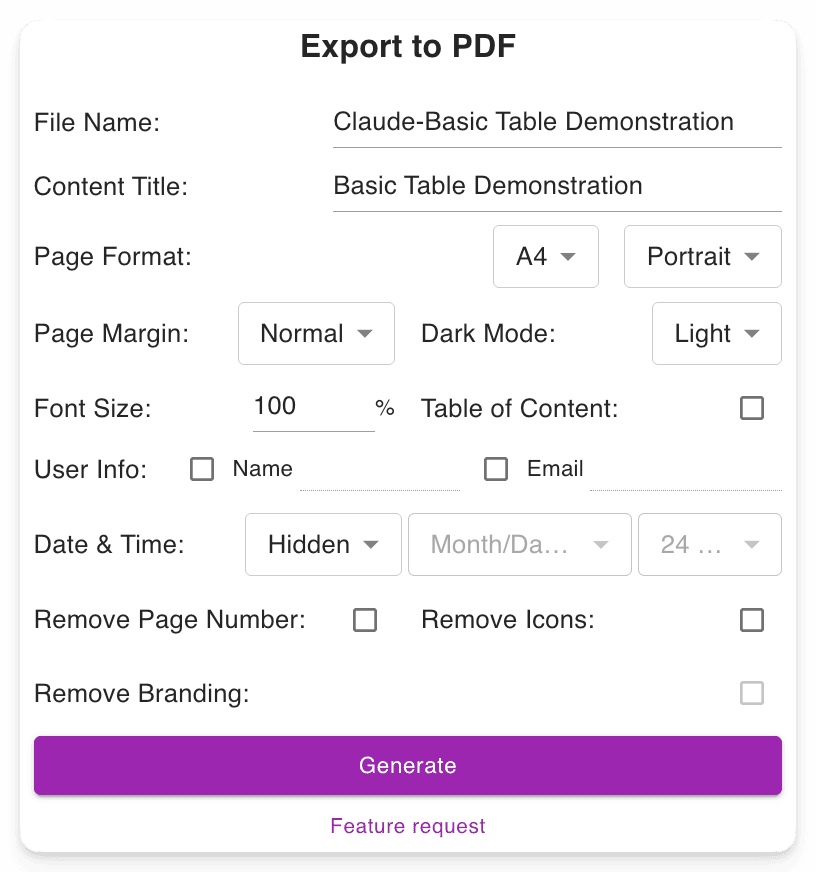
Legen Sie Ihren bevorzugten Dateinamen fest. Definieren Sie den Inhaltstittel. Passen Sie das PDF-Format an, wählen Sie zwischen Dark und Light Mode, ohne die Grok-Oberfläche zu ändern. Enthält Seitenzahlen für einfache Navigation in langen PDFs.
Erweiterte Ausgaben bleiben erhalten
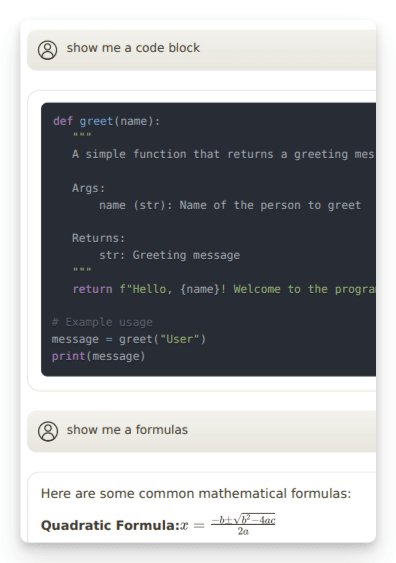
Behält wichtige Formatierungen bei: Mathematische Formeln (Block und Inline). Code-Blöcke für Entwickler. Tabellen und strukturierte Inhalte.
"Nice exporter"

"Wonderful and easy to use. The PDF exporter is excellent."

"Used the PDF tool and it worked well. The export to PDF tool Grok shows at the end of the convo only exports the last answer, not the entire conversation. With this tool you can select "all" which is a big time saver. Note, if you find that you are not getting all pages or an error message, try scrolling through the convo top to bottom, then save. I did have a couple issues that scrolling fixed for me."

"Finally something that works! Excellent!"

"好用的"

"It ACTUALLY works, highly recommended if you can't find a working exporter. EZ 5/5"

"Buenísima extensión para Grok."

"很好, 可以完整Export 整個對話, 是Grok 本身沒有的功能"

"Simple of use! Exectry what we do need! Very good product, congrats, congrats, congrats!"

"Works nicely."

"Simple and effective. Excellent helper app."

"非常好 ,好得沒得挑剔 ,尤其大量文字對話上幫助我儲存內容 ,讓我後續有靈感時最大發揮!!"

"Works perfectly, no fuss, rare nowadays, 5 stars!!!"

"Amazing tool, lifesaver, so easy!"

"simplemente practico, 10/10"

"I tried 4 diffferent extensions to export Grok to PDF. This was be far the best (and the pdf export is only in beta!)"

"I suppose I should really have used it for longer but already I am impressed. I have not compared it with others but it is simple which to myself is important. If you have not tried a Grok exporter before then certainly try this first because it is so simple. I got my install and learn time back within a few minutes. After installing you need to refresh he grok screen for the extension to start working. I like printing at 75% so maybe try that and see what you think. There is - well to me - a little logic quirk in that if you want to select individual blocks - say just the last one of maybe 30 - you first have to select all - then a bit appears at the side - where you can unselect all - er wrong logic to me - and then you can manually select just the last block. I didn't notice it at first but IMO it would be better to have this on the first selection. Now I know it will be fine."

"It's just amazing! The best IA chat exporter."

"Exports chats accurately into Pdf and Markdown txt (not used other formats). Very usefull for offline reading."

"inpressed allready with the features"

"Super impressed with this Grok Exporter. The PDF formatting was spot on. Easy to install. Navigation was simple. Very thankful for this being developed."

"I often forget to go back and write reviews on applications that I like but the pop up after each use kept reminding me LOL This extension is absolutely AMAZING It's improved my work flow dramatically and helped me plug a leak of information that I'd just been ignoring until recently. Thank you so much for this"

"Seems to work well. It would nice to be able to pay some cash and get the ads removed from the output."

"Works great and formatting looks good!"

"Still trying to figure out how to use it. I usually use Grok from X. I guess I have to go to a different Grok page?"

"Süper uygulama emeği geçenlere teşekkür ederim.Artık sohbetlerimi arşivleyebileceğim.5 yıldız değil 10 yıldızı hakkediyor,"

"Works"

"Absolutely Awesome!"

"Perfect! Just what I was looking for!! Great Job!"

"NIce work guys, keep improving it."

Bereit, einzutauchen?
Installieren Sie AI Grok-Exporter jetzt.
Steigern Sie Ihre Produktivität mit dem ultimativen Tool, um Grok-Ergebnisse als PDF, Markdown, Text, JSON oder CSV herunterzuladen.